How to Know When Washing Machine Is Done
Learn how to know when a washing machine is done with confidence. This guide covers end signals, beeps, door unlock cues, and model variations to help you unload promptly and avoid damp laundry.


To know when a washing machine is done, rely on the cycle signals: the display reads Done, the drum stops spinning, and the door unlocks. Listen for the end beep, check that clothes are evenly distributed, and verify they feel largely dry to the touch. According to Best Washing Machine, always verify signals on your model's panel, because variations exist.
Understanding how washers signal completion
Cycle completion is not a single universal signal; it is a combination of displays, sounds, and physical states. Modern washers use logic that coordinates the wash, rinse, and spin stages, and only when these stages are fully concluded will the machine enter a neutral state and issue a completion cue. This cue is designed to be detected by most users without guessing. According to Best Washing Machine, manufacturers vary in how they present these cues, so identify the few cues your model consistently uses and stay consistent with them. Remember, relying on multiple cues (visual + audible + tactile) increases your accuracy when determining if a load is truly finished.
In practice, think of “done” as a moment when the machine is ready to be opened safely and the clothes are ready for handling. Having a quick mental checklist helps homeowners, renters, and even operators of small laundromats avoid unloading prematurely or leaving damp laundry in the drum. A reliable done signal saves time and reduces energy waste in future cycles.
The role of the display and signals
The display is usually the primary source of truth for completion. Look for a clear “Done” or “End” label, a final timer reading that reaches zero, or a dedicated completion icon. Some models show a blinking light that stops, or a soft chime when the cycle ends. If your panel uses text instead of icons, be sure to note the exact wording, as variants like “End,” “Complete,” or “Idle” may appear. It’s common for the screen to briefly show the next ready state after the cycle finishes, then return to a standby screen. Consistency matters: train yourself to depend on your model’s usual end-state rather than a single cue that might appear during other operations.
When signs differ from one model to another, prioritize the cues your owner’s manual highlights and the patterns you’ve observed over several cycles. This approach minimizes confusion and helps you act quickly when you need to rotate loads or switch settings.
End-of-cycle beeps and audible signals
Audible cues are a second layer of confirmation. Many washers emit a distinctive end beep, chime, or a sequence of tones signaling completion. Some models also play a short melody or a series of beeps that repeat until you press a button to acknowledge. If you have a particularly loud household, you can adjust the volume or choose a softer tone if the model allows it. The key is to recognize the telltale end-signal as separate from normal operation beeps (like starting a cycle or adding laundry mid-cycle). For consistency, count the beeps or observe where the sequence ends, then verify the display shows a done-state as well.
Note that some cycles may include a brief pause before the final beep, especially on longer or more energy-efficient programs. Don’t confuse this with the actual completion—wait for the definitive end cue before unloading.
Visual cues: door unlock and drum position
Many washers unlock the door only after a cycle is fully finished and the drum has come to rest. A successful unlock indicates the machine has completed safety checks internally and is safe to open. If your model uses a child-safety lock or a door-lock indicator, ensure the lock releases before attempting to open. Also, visually inspect the drum: if it’s clearly stationary and clothes aren’t shifting with a gentle nudge, you’re likely in the done state.
For front-load models, the door lock indicator and a still drum are the most reliable cues. For top-load machines, a stationary lid and no loud spinning sounds often signal completion. If you still hear movement after the end signal, double-check that the cycle didn’t switch to a different program mid-run.
Cycle types and what completion looks like
Different cycles terminate in distinct ways. A quick wash typically finishes faster, while heavy-duty or bulky cycles can take longer and may have a longer final spin. Delicate or hand-wash programs may end with gentler motions or fewer beeps. High-efficiency machines often prioritize energy savings and may reduce spin speed, which can affect how dry clothes feel at the end. This means your sense of “dry enough” can vary by cycle type.
To avoid surprises, familiarize yourself with the end signals tied to each cycle on your specific model. If you frequently run mixed loads, consider adding a final spin or a brief extra rinse/spin to maximize dryness in loads that need it. Consistency here helps keep your laundry routine predictable and efficient.
Troubleshooting: cycle seems stuck or not finishing
If a cycle appears stuck, don’t force the door or power off abruptly. Start with the pause or cancel option if available, then allow the machine to reset. Some models require a reset sequence or an unplug-and-replug action to clear a fault or sensor error. If you see an error code, consult the manual or the manufacturer’s support site—codes often point to blocked drains, load imbalance, or door issues that can mimic a “not finished” state.
Document any codes and the cycle type to help service calls be faster if you need professional help. In many cases, the fix is simple: redistribute a heavy load, remove tangled fabrics, or clean a clogged filter or drainage path.
If the cycle consistently refuses to end despite resets, consider recording model-specific end signals and consult a technician. Regular maintenance reduces the risk of stuck cycles and keeps feedback signals accurate.
Dryness check: assessing moisture before unloading
Even after a cycle ends, clothes can feel damp, especially in larger loads or on eco-friendly cycles with gentler spins. A practical test is to take a small, representative sample from the load and feel for dampness. You can also use a quick manual squeeze test on items like towels or jeans to gauge residual moisture. If dampness is evident, run a brief extra spin or a second cycle with a higher spin speed. This avoids damp laundry and reduces the need for air-drying that can take longer and cost more energy.
Remember: moisture is not the same as wet, and the goal is to reach a level of dryness that suits your next step—from folding to air-drying to machine-drying.
If the clothes feel unexpectedly damp across several cycles, investigate spin speed settings, balance issues, or lint buildup in the filter. Regular checks can help maintain consistent dryness outcomes.
Maintenance and quick post-cycle care to ensure reliable completion signals
After unloading, give your washer a quick wipe-down to remove moisture and prevent mold growth. Leave the door or lid ajar for a few minutes to air out the drum, especially in humid climates. Clean lint screens or filters per the manual and check hoses for kinks or leaks. A well-maintained machine is not only quieter and more efficient but also more reliable when signaling cycle completion.
If you rely on smart features or an app, keep firmware updated and periodically verify that app-reported signals align with the physical cues on the machine. This alignment reduces confusion and improves confidence in the completion signals you depend on.
Quick-start printable checklist
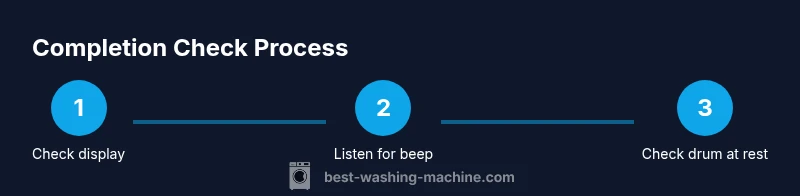
Print this brief checklist and keep it near the laundry area. Confirm the end indicators on the display, listen for the final beep, and verify the door unlocks before unloading. Check for dryness by a quick fabric feel test, and if necessary, run a final spin. Maintain a habit of leaving the drum slightly ajar after cycles to prevent dampness and mold.
Tools & Materials
- User manual (model-specific)(Keep it handy for model signals and error codes)
- Access to display panel(Ensure you can clearly read end signals and text on the screen)
- Notepad and pen(For noting cues and any codes you observe)
- Small flashlight(Useful for peering into the drum area or lint filter if lighting is poor)
Steps
Estimated time: 5-15 minutes
- 1
Check the end-state on the display
Examine the display for a definitive end-state like Done, End, or a similar completion cue. Note any remaining countdown or alternative messages that might indicate standby rather than completion.
Tip: Always verify two cues (display and physical state) to avoid misreading a transient screen message. - 2
Listen for the final end signal
Pay attention to the final beep or chime sequence. Some models use a distinct pattern that repeats if you don’t acknowledge it. Distinguish it from routine alerts used at cycle start.
Tip: Better to wait until the sound completes its sequence before judging completion. - 3
Confirm the drum is at rest
Gently wiggle the drum or listen for stillness. If you hear movement, the cycle may not be finished. A stationary drum is a strong cue that the load can be safely handled.
Tip: Avoid forcing the door if you still hear tumbling sounds—pause or wait until the drum is completely still. - 4
Test the door unlock
Attempt to open the door or lid once you see the end-state. Many washers will unlock only after safety checks; a locked door means you should wait a moment longer or consult the manual.
Tip: If it remains locked, do not force it; some models require a short cooldown period. - 5
Assess moisture in a small sample
Check a few items for dampness. If most items feel damp, the load may need an extra spin or a longer cycle aimed at higher dryness.
Tip: Prioritize items with heavier moisture (towels, jeans) to judge overall dryness. - 6
Consider cycle type effects
Recognize that quick cycles may finish with gentler spins, producing drier clothes than longer, heavy-duty cycles. This affects your perception of “done.”
Tip: Adjust expectations by cycle type; don’t compare a quick wash to a heavy-duty program. - 7
Run a quick extra spin if needed
If dryness is insufficient, run a brief extra spin or a short cycle with high spin speed. This is often faster than rewashing and can save energy.
Tip: Use a dedicated extra spin option if available to preserve fabric integrity. - 8
Unload and inspect the drum
Remove clothes promptly after completion to prevent mildew. Check the drum for buildup or residue that might affect future performance.
Tip: Wipe the drum and gasket lightly to extend machine life. - 9
Document results for next load
Note any unusual signals or delays you observed. This can help you troubleshoot future cycles or communicate with service if needed.
Tip: A simple log saves time when diagnosing repeated issues.
FAQ
What are the universal signs a washer is done?
Most washers display a final state such as Done or End, emit a completion beep, and unlock the door. Model variations exist, so always cross-check with your manual.
Look for the Done display, the door unlocks, and the end beep to confirm completion.
Why does my washer stay locked after it finishes?
Door locks may linger due to safety features or a temporary fault reset. Wait a few minutes for the lock to release, or consult the manual if it remains locked.
If the door stays locked, don’t force it—wait a bit or check the manual for unlock steps.
What if clothes are damp after a cycle?
Check spin speed, load balance, and cycle type. If needed, run a brief extra spin or a higher-speed cycle to improve dryness.
If your clothes are damp, try an extra spin or a higher-speed setting next time.
Can I stop a cycle early to check status?
Use the pause or cancel option if your model supports it. Not all cycles allow mid-cycle interruption, so always follow the manual.
You can pause or cancel on compatible models, but don’t yank the plug mid-cycle.
What maintenance helps signals stay accurate?
Keep the drum clean, clear lint filters, and inspect hoses regularly. Clean signals rely on a well-maintained system.
Regular maintenance keeps your end signals reliable.
Watch Video
The Essentials
- Learn the key end signals across different models.
- Balance visual, audible, and tactile cues for accuracy.
- Different cycle types finish differently—consider this when judging dryness.
- Unload promptly to prevent mildew and odor.
- Keep a simple post-cycle checklist to reduce mistakes.