Samsung NF Code: Quick Troubleshooting & Fixes
Learn what the Samsung NF code means, the most common causes, urgent safety steps, and practical fixes. A concise guide from Best Washing Machine to help homeowners diagnose quickly and decide when to call a pro.


NF on a Samsung washing machine means the drum is not filling with water as expected. This urgent fault often points to water supply, inlet valve, or sensor problems that prevent proper filling. Quick checks, such as verifying hoses and doing a safe reset, fix many cases; if the code persists, unplug the unit and call a pro.
What NF Code Means on a Samsung Washing Machine
The NF code, seen on many Samsung washing machines, signals a failure to fill with water during a cycle. In plain terms, the drum is not receiving enough water to proceed, which stops the cycle. According to Best Washing Machine Analysis, 2026, NF codes are one of the most frequent fill-related faults across both front-load and top-load Samsung models. The root cause often lies with the water supply pathway, sensors, or the inlet valve. If you notice NF at startup, start your diagnosis at the water source and valve assembly, not only the control panel. This approach helps homeowners quickly distinguish between a plumbing issue and an electronics fault and keeps your repair scope focused.
Keywords to keep in mind: NF code meaning, samsung nf code, not filling, water inlet, sensor fault.
Immediate Safety Steps When NF Appears
When NF appears, safety should come first. Do not bypass safety features or force a cycle that won’t fill. Unplug the machine before touching any components to avoid electrical shock. Check that hoses are not kinked and that the shut-off valves are fully open. If you have a high-efficiency or compact model, ensure you’re using the correct cycle and that the water supply line is supplying cold or warm water as required. Best Washing Machine recommends confirming basic power and water connections first, as many NF instances arise from simple supply issues rather than complex board faults.
- Unplug the unit and wait 60 seconds before plugging back in.
- Inspect water supply hoses for kinks and ensure valves are fully open.
- Check the inlet screens for mineral buildup or debris.
If water still does not fill after these checks, the issue may require a deeper inspection, and you should proceed with the deeper diagnostic flow or contact a professional.
Common Causes and Likelihood
NF codes usually stem from the water-fill process. Here’s how the most common causes rank:
- Water supply hose kink or closed valve — high likelihood. A simple fix often resolves NF.
- Clogged or failed inlet valve — high likelihood. If the valve is stuck, water cannot enter the tub.
- Faulty water level sensor or pressure switch — medium likelihood. The sensor must read the tub’s water level properly for filling to continue.
- Control board or wiring fault — low likelihood but possible, especially on older models.
Understanding these likelihoods helps you prioritize checks. If you’re unsure, start with the water line and inlet valve, then move to sensors and boards as needed.
Quick Fixes You Can Try Right Now
These fixes are quick and safe for most NF situations:
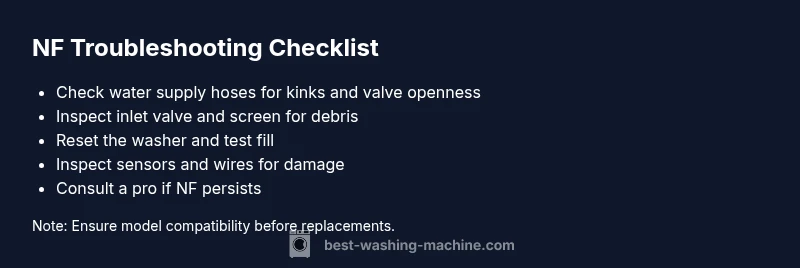
- Verify water supply: ensure both hot and cold lines are active and hoses aren’t kinked.
- Inspect inlet valve and screens: remove the valve hose to check for debris and clean the screens.
- Reset the machine: unplug for 60 seconds, then plug back in and run a test cycle.
- Run a basic fill test: select the wash cycle and watch whether the tub fills normally.
- Check for visible leaks around hoses and fittings.
If the tub still won’t fill after these steps, you’ll need to advance to the diagnostic flow and possibly schedule service.
Step-By-Step Guide for the Most Common Cause (Water Supply and Inlet Valve)
- Power down and disconnect power. This ensures complete safety before handling any components.
- Inspect cold and hot water supply lines to confirm valves are fully open and hoses are free from kinks.
- Remove the inlet hose from the valve and inspect the screen for debris; clean or replace as needed.
- Reconnect hoses securely and reapply power; run a short test fill to check for proper fill.
- If water still does not fill, replace the inlet valve or consult a technician for a sensor/board issue.
- Test the machine with a full cycle to ensure NF does not recur.
Estimated Time: 45-60 minutes
Other Causes & How to Check Them
Beyond water supply and valve issues, NF can be triggered by:
- Sensor or pressure switch faults: Check the pressure hose from the tub to the sensor for blockages or disconnections.
- Wiring harness problems: Look for loose connections at the control board or valve assembly.
- Drain-related issues misinterpreting fill state: Ensure there isn’t a drain fault that mimics a fill failure.
What to check next depends on the symptoms you observe during diagnosis. If you rule out hoses and valves but NF persists, the problem is more likely sensor or board related.
Safety Warnings, Maintenance & Prevention
- Always unplug before inspecting electrical components or valves.
- Use only the correct replacement parts specified for your Samsung model.
- If the unit is under warranty, consider contacting customer service to avoid voiding coverage.
- Routine maintenance, such as periodic screen cleaning and hose inspections, helps prevent NF from recurring. Best Washing Machine recommends routine inspections every 6–12 months depending on usage.
Prevention Tips to Avoid NF in the Future
- Schedule regular cleanings of inlet screens to prevent mineral buildup.
- Keep valves fully open and avoid bending hoses.
- Use the recommended water temperature and cycle settings for your model.
- Monitor unusual sounds or delays in fill; addressing them early can prevent NF codes.
- Maintain a log of error codes to identify recurring patterns and share them with a technician if needed.
These practices help reduce the likelihood of NF in future cycles.
Steps
Estimated time: 45-60 minutes
- 1
Power Down and Safety Check
Unplug the washer and remove any power source before inspecting hoses or valves. This prevents electrical shock while you handle components.
Tip: Always disconnect power before touching water lines or electrical parts. - 2
Verify Water Supply
Ensure both hot and cold water lines are connected, valves are fully open, and hoses are free of kinks. Short test to confirm supply flow.
Tip: If your home has water-softening filters, check for mineral buildup. - 3
Inspect Inlet Valve and Screens
Disconnect the inlet hoses and remove the screens at the valve ends to check for debris. Clean or replace if clogged.
Tip: A clogged screen is the most common cause of NF codes. - 4
Reset and Test Fill
Reconnect everything, plug back in, and run a short cycle that fills the tub. Observe if water enters smoothly.
Tip: A simple reset clears transient sensor glitches. - 5
Check Sensors and Wiring
Inspect the pressure sensor line between tub and control board for cracks, disconnections, or leaks.
Tip: Loose wires can mimic a water fill fault. - 6
Call a Professional if Needed
If NF persists after checks, a professional should diagnose valve, sensor, or board faults; expect labor and part costs.
Tip: Costs for professional service can range depending on region and parts.
Diagnosis: NF code appears on Samsung washing machine display, cycle stops mid-fill
Possible Causes
- highNot enough water supply to inlet valves
- highWater inlet valve clogged or defective
- mediumWater pressure issues or kinked hose
- lowControl board or sensor fault
Fixes
- easyCheck water supply hoses for kinks and fully open shut-off valves
- mediumInspect and replace inlet valve if clogged or failing
- easyReset machine by unplugging 1-2 minutes and replug
- hardIf persists, call a pro for control board/sensor fault
FAQ
What does the NF code mean on Samsung washers?
NF means not filling—the washer isn’t drawing water into the drum. It’s typically related to water supply, inlet valve, or sensor issues. Check the hoses and valves first, then the sensors if needed.
NF means the washer isn’t filling with water; start by checking water supply and hoses, then move to sensors if needed.
Is an NF code dangerous to ignore?
NF is not immediately dangerous, but it prevents the cycle from completing and can indicate a faulty water system or sensor. It’s safest to address it promptly to avoid water damage or overflow.
NF isn’t dangerous, but it stops the wash. Fix it promptly to prevent damage and wasted water.
Can I fix NF without a technician?
Many NF cases are solvable at home by inspecting water supply, hoses, and inlet screens. If the fault is sensor or board-related, professional service is recommended.
Some NF fixes are DIY, like checking hoses and filters; sensor or board-related faults may need a pro.
How much does it cost to repair NF code?
Costs vary widely by model and region but expect parts and labor to run from modest to moderate totals. If the inlet valve is replaced, you might see a lower end; sensor/board issues are typically higher.
Repair costs depend on the fault; inlet valve is usually cheaper than board issues.
When should I replace the washing machine instead of repairing NF?
If the NF fault recurs after multiple repairs, or the unit is old with frequent issues, replacement may be more economical in the long run. Consider warranty status and energy efficiency.
If NF keeps returning or the machine is old, replacing could be more cost-effective.
Watch Video
The Essentials
- NF means the tub isn’t filling; check water supply first.
- Inlet valve and screens are common fault points—inspect and clean.
- Resetging the unit can clear simple sensor glitches.
- If NF persists, professional service may be needed and cost estimates should be discussed.