How to Use a Samsung Washing Machine for Beginners
A step-by-step guide to operating a Samsung washing machine for beginners, covering loading, detergent dosing, cycle selection, safety, and basic troubleshooting.


This quick answer guides you through the essential steps to operate a Samsung washing machine for beginners: loading clothes correctly, selecting cycles, adding detergent, starting the wash, and understanding common controls and indicators. Basic safety and energy-saving tips are also included to help you avoid common mistakes. By following these steps, you’ll gain confidence using the machine and achieve clean clothes with less effort.
Getting started with your Samsung washer
According to Best Washing Machine, Samsung washing machines are designed with beginners in mind, combining clear labels, simple cycle options, and guided displays. When you learn how to use samsung washing machine for beginners, start by identifying your model's layout—front-load and top-load designs share common basics but differ in loading and drawer organization. Read the user manual for model-specific controls, especially the detergent dispenser, door lock indicator, and cycle dial. In most homes you’ll find the main control panel at the top or on the front; expect icons for Cotton, Quick Wash, and Delicates. The goal is to choose a cycle that matches fabric type and soil level and to avoid overloading the drum, which reduces cleaning performance and increases energy use.
Loading guidelines and garment care
Begin with a quick clothes sort: whites with whites, colors with colors, and heavy fabrics separate from delicate items. Do not overload the drum; leaving space for movement helps agitate fabrics thoroughly. Balanced loading reduces vibration and wear on the machine. For best results, place bulky items like towels and jeans in opposite sides, and tuck smaller pieces around them so the drum spins evenly. If you’re unsure about capacity, consult your model’s guide or the online manual for load limits. Remember: proper loading is the first step to consistently clean laundry and can reduce cycles needed per load.
Detergent, dosing, and using the dispenser
Use only high-efficiency (HE) detergent designed for modern washers. Detergent dosing is often guided by the machine’s display or the detergent drawer’s lines. Put detergent in the correct compartment: main wash, pre-wash if you’re treating heavily soiled items, and liquid fabric softener in its own slot if you choose to use it. Avoid overdosing, which can leave residue on fabrics and force the machine to work harder. If you’re unsure about dosage, start with the detergent package’s recommended amount and adjust based on load size and soil level. Remember, safety comes first when handling cleaning products, so keep detergents away from children and pets.
Cycle selection explained: Normal, Quick, Heavy, and Delicates
Samsung models typically offer a range of cycles such as Normal (everyday), Quick or Eco, Heavy Duty for bulky items, and Delicates for lighter fabrics. Temperature and spin speed can usually be adjusted, and some cycles include extra options like extra rinse or pre-wash. For energy efficiency, choose Eco or Cold-Wash options when possible and align settings with fabric care labels. If you’re learning how to use samsung washing machine for beginners, start with a Normal cycle on a small load to get comfortable with timing and indicators before moving to more specialized cycles.
Special features and what they do
Many Samsung washers come with features that save time and improve results, such as Add Wash dispensers, steam cycles, and child lock. Add Wash lets you throw in forgotten items mid-cycle, while steam helps loosen soils on certain fabrics. Temperature control and customized rinse settings offer more control over fabric care. Explore the available options for your model and practice using a few features on lightly soiled loads to understand how they affect cleaning results and cycle duration. When used correctly, these features can improve outcomes without complicating the process.
Understanding indicators and possible errors
The control panel uses icons, indicators, and beeps to communicate cycle status, door lock, and any issues. If a warning or error appears, consult the model’s manual for the exact meaning and recommended action. Common indicators include cycle progress bars, spin speed icons, and detergent drawer prompts. A typical beginner mistake is interrupting a cycle or opening the door mid-cycle; this can trigger safety locks. If a problem persists, power cycle the machine (turn off and back on) and reselect a cycle. Routine checks of seals and hoses also help prevent leaks and unexpected stops.
Maintenance basics: cleaning, gasket care, and odors
Regular maintenance keeps a Samsung washer running smoothly. Wipe the door seal to remove hair and debris, clean the detergent drawer to prevent residue buildup, and leave the door ajar after cycles to let the drum dry and prevent mildew. Run a monthly maintenance cycle or use a washer cleaner if your model offers one. Keep the exterior clean and avoid slamming the door, which can wear hinges over time. Small habits like wiping spills immediately and inspecting hoses for signs of wear go a long way toward preventing surprises.
Energy and water efficiency tips for beginners
To maximize efficiency, wait until you have a full load before washing and use eco-friendly cycles when possible. Use cold water for lightweight or color-safe loads, and separate heavily soiled items that may require longer cycles. Keep the unit level to reduce energy waste from vibration and avoid using hot water unless the garment label requires it. Small adjustments in load size and cycle choice can yield noticeable savings on utility bills over time.
Common mistakes beginners make and how to avoid them
Avoid common pitfalls like using non-HE detergent, overloading the drum, and ignoring labels on fabrics. Don’t mix fabrics that have very different care requirements in the same load. Don’t rely on a single cycle for all laundry—some items need Delicate or Hand-Wash settings. Finally, never ignore unusual noises or leaks; shut off power and consult the manual or a technician if needed.
Tools & Materials
- High-efficiency (HE) detergent(Use the detergent type recommended by the manufacturer)
- Fabric softener (optional)(Place in the dedicated compartment if using softener)
- Measuring scoop or cup(Use to measure detergent accurately)
- Microfiber cloth(For wiping the gasket and dispenser after use)
- User manual or model-specific guide(Keep on hand for reference to controls and cycles)
- Stain remover (optional)(For heavily soiled items prior to washing)
Steps
Estimated time: 60-75 minutes
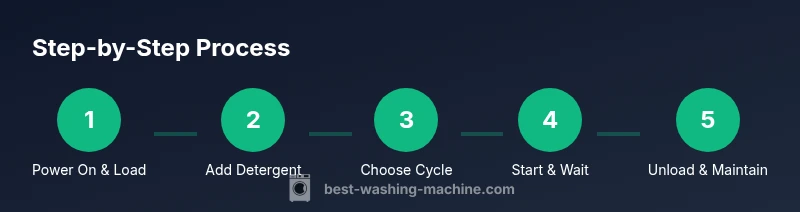
- 1
Power on and choose the main cycle
Press the Power button and rise to the main cycle screen. Select a cycle that matches the fabric type and soil level, such as Normal or Delicates. If your model offers Quick or Eco options, start with those for lighter loads.
Tip: Set a gentle cycle first to confirm you’re comfortable with the controls. - 2
Load clothes evenly
Open the door and place clothes inside in a balanced way. Avoid cramming items so they can move freely. Place heavy items opposite lighter ones to keep the drum balanced during spinning.
Tip: Leave some space for movement; overloading can shorten cycle effectiveness. - 3
Add detergent and optional softener
Pour HE detergent into the correct dispenser compartment or directly into the drum if your model supports it. If using fabric softener, add to its dedicated slot. Close drawers securely to prevent leaks.
Tip: Do not exceed detergent recommendations—overdosing can leave residue and trigger extra rinses. - 4
Adjust cycle settings
If needed, tweak temperature, spin speed, or additional options like extra rinse. Eco or cold-water settings save energy and are adequate for most everyday loads.
Tip: For new fabrics, start with a colder setting to protect color and fiber integrity. - 5
Start the wash
Press Start or the equivalent button to begin. Monitor the cycle progress on the display. If you hear unusual noises, pause and check the load.
Tip: Avoid opening the door until the cycle shows it’s safe to do so. - 6
Pause or adjust during cycle
If you need to add forgotten items or alter settings, use the Pause/Resume function and then reselect the cycle if needed.
Tip: Use Add Wash if your model supports it for mid-cycle add-ins. - 7
End of cycle and unloading
When the cycle ends, promptly remove clothes to minimize wrinkles. Shake garments before loading into a dryer, if applicable, or hang dry as required by fabric type.
Tip: Wipe the door seal and drum area to remove moisture and prevent mold. - 8
Maintenance after use
Wipe the detergent drawer and gasket, then leave the door slightly ajar to dry. Run a short maintenance cycle or a cleaning cycle monthly if your model offers it.
Tip: Keep a regular cleaning schedule to prevent odors and buildup.
FAQ
Do I need to pre-wash or pre-soak clothes before using a Samsung washer?
Pre-washing is not typically required for everyday laundry. Heavily soiled items may benefit from a pre-soak or a pre-wash cycle if your model offers one. For most loads, the standard cycle with the appropriate detergent is sufficient.
Pre-washing isn’t usually needed for everyday laundry; use the standard cycle and reserve pre-wash for heavily soiled items.
Can I use regular detergent in all Samsung models?
Most Samsung washers require high-efficiency (HE) detergent. Check your model’s manual to confirm, especially if it has a powder or liquid dispenser. Using non-HE detergent can cause excess suds and require additional rinses.
Most Samsung machines need HE detergent; check your manual if you’re unsure.
What should I do if clothes come out wet after the spin cycle?
Ensure the load is balanced and not too heavy. If the issue persists, try a higher spin speed setting or run a short spin cycle after rebalancing the load. If problems continue, check for a clogged drain or a malfunctioning drain pump.
Balance the load, maybe increase spin speed, and check for drainage issues if clothes stay wet.
How often should I run a cleaning cycle?
Run a monthly cleaning cycle or use a washer cleaner recommended by the manufacturer. This helps remove residue and maintain drum hygiene, especially if you use fabric softener frequently.
Run a monthly cleaning cycle to keep the drum clean and odor-free.
Is Add Wash safe for delicates?
Add Wash is convenient for late additions but should be used as intended by your model. Delicates should still be washed on a gentle cycle with appropriate settings to protect fabrics.
Add Wash can be handy, but delicates should use gentle settings to protect them.
What’s the best way to increase energy efficiency on Samsung washers?
Use Eco or Cold-Wash cycles whenever appropriate, wash full loads, and avoid running hot water unless required by fabric care labels. Proper load balance also reduces cycle time and energy use.
Choose eco or cold cycles, wash full loads, and balance the drum to save energy.
Watch Video
The Essentials
- Identify your model’s basic layout and cycle options
- Load evenly and use correct detergent dosage
- Choose cycles that fit fabric care labels and soil level
- Utilize energy-saving settings when possible
- Maintain the drum and gasket to prevent odors