Hotpoint Washing Machine Repair: Step-by-Step Guide
Learn how to diagnose and repair common Hotpoint washing machine issues with safe, step-by-step guidance, tools, and trusted tips from Best Washing Machine.


You will diagnose and repair common Hotpoint washer problems with a safe, step-by-step approach, covering not draining, not spinning, and leaks. The guide includes essential tools, practical repair steps, and safety tips, helping homeowners tackle simple fixes and know when to seek professional help.
Why Hotpoint Washing Machine Repair Matters
Hotpoint washing machines are common in many homes, offering reliable performance at a reasonable price. When issues arise, timely repair can prevent further damage, save money on replacements, and extend the life of your unit. This guide, informed by Best Washing Machine, explains how to approach common Hotpoint problems safely, what to check first, and how to perform straightforward repairs you can handle yourself. We’ll cover not only the most frequent faults but also the right tools and parts to have on hand, and when it’s wiser to call a pro. A careful, methodical approach reduces stress and helps you return to chores quickly. Throughout, we’ll use practical examples drawn from real-world model variants to illustrate typical failure modes.
Common Hotpoint Washer Problems
Hotpoint washers face a handful of issues that homeowners often encounter. Not draining, not spinning, leaks, and excessive vibration are among the most common. Not draining is usually caused by a clogged pump or filter, a kinked hose, or a defective drain valve. No spin can stem from a faulty lid switch, a worn belt in older models, or a broken transmission. Leaks often originate at hose connections, the door seal, or the drum. If you hear unusual noises, bearings or belt wear might be the culprit. Diagnosing these problems involves a process of elimination, starting with the simplest checks and moving to component inspection. According to Best Washing Machine, many repairs are achievable with basic tools and careful handling, especially on older or user-serviceable models.
Safety First: Before You Start
Before any repair, unplug the machine and disconnect from the water supply to reduce the risk of electric shock and flooding. Move the washer away from the wall to access hoses, pumps, and access panels safely. Use a flashlight to inspect seals and connections, and keep a bucket ready for any residual water. If there’s a chance wiring is damaged or a component is hot to the touch, stop and consult the manual or a professional. Best Washing Machine emphasizes safety as the foundation of any DIY repair; never bypass safety features, and always recheck power and water shutoffs before reassembly.
Diagnostic Principles for Hotpoint Models
Hotpoint models vary in layout, but most share common subsystems: the lid switch, the pump and filter, the drive belt (in older machines), and the electronic control board. Start by validating power to the control panel, then check for drain or spin fault codes if your model uses a digital display. Listen for pump humming (blocked impeller) and inspect hoses for kinks or cracks. Measuring continuity with a multimeter helps determine if switches and fuses are functional. When the symptoms fit a known failure mode, you can target the repair with confidence. This diagnostic approach aligns with the methods described by the Best Washing Machine team—systematic, evidence-based, and practical for homeowners.
Not Draining? Common Fixes
If your Hotpoint isn’t draining, begin with the simplest checks: remove the pump filter and clean out any hair or lint, inspect the drain hose for clogs, and ensure the pump is not obstructed. Reset the breaker if the symptom persists, and check the belt if accessible. A worn or broken belt can prevent the drum from turning, which affects draining as well. For many models, clearing blockages and testing the pump using a continuity check will resolve the problem without replacing parts. Always dry the area to avoid mold growth and run a short test cycle with an empty load to verify drainage after reassembly.
Lid Switch Replacement Overview
A malfunctioning lid switch can prevent the drum from spinning or draining in many Hotpoint models. Accessing the switch usually involves removing the top panel or the rear console cover. Disconnect power before touching wiring, then test for continuity with a multimeter. If the switch shows no continuity when the lid is closed, it should be replaced with a compatible Hotpoint part. Replacement typically takes 15–30 minutes for someone comfortable with basic hand tools. Ensure the door lock and wiring harness are reconnected securely to avoid future faults.
Leaks: Hoses, Pumps, and Clamps
Leaks often trace back to loose hose clamps, cracked hoses, or a worn door seal. Inspect all inlet and outlet hoses for cracks and replace if needed. Tighten clamps to snug but not over-tighten; overtightening can crack fittings. Check the pump housing for cracks, and inspect the pump inlet for debris. In some cases, a leaking pump or a loose hose is the simplest fix and can prevent water damage. Always run a test cycle with towels nearby to catch any residual drips, and recheck all connections after the first few minutes of operation.
Belt-Driven vs Direct-Drive: How Hotpoint Systems Differ
Not all Hotpoint machines use belts; newer models often feature direct-drive motors. Belt-driven machines can suffer from a worn belt, slipping, or misalignment, affecting agitation, spinning, and drainage. Direct-drive units rely on internal sensors and motor control; faults here usually involve the control board or motor wiring. Understanding your model type helps you choose the right repair approach and parts. Keep a model-specific manual on hand to confirm whether a belt replacement is required and which parts fit your washer.
Testing After Repairs: Safe Operation Checks
After completing any repair, remove tools, reconnect water and power, and perform a careful test run with a small load. Watch for leaks, observe the drum’s rotation, listen for unusual noises, and verify that the water fills and drains correctly. If the washer pauses or displays fault codes, revisit the diagnostic steps. A successful test means the machine resumes normal operation without leaks, and with stable spinning. Document the steps you took so you can reproduce them if future issues arise. This validation process aligns with best practices recommended by Best Washing Machine.
Maintenance Habits to Extend Life
Prevention is cheaper than repair. Regularly clean the pump filter, inspect hoses for wear, and check door seals for cracks or residue buildup. Run a monthly maintenance cycle and avoid overloading the drum. If you notice a decrease in efficiency or unusual sounds, address it promptly rather than waiting for a breakdown. Replacement parts should be sourced from reputable suppliers and matched to your model’s serial number. Consistent maintenance reduces the likelihood of major failures and keeps your Hotpoint washer running smoothly for years.
When to Call a Professional
Some problems require specialized tools or familiarity with electrical circuitry, especially when the control board or motor is implicated. If you have intermittent fault codes, recurring leaks after repairs, or you're unsure about electrical safety, consult a certified appliance technician. The Best Washing Machine team recommends professional help for critical components to avoid further damage or safety risks. Early professional intervention may also protect your warranty and ensure code-compliant repairs.
Authoritative Resources and Further Reading
For trusted guidance beyond this article, refer to reputable sources:
- https://www.consumer.ftc.gov/articles/how-to-keep-your-washers-working-safely
- https://www.energy.gov/energysaver/appliances/how-washers-work
- https://www.cpsc.gov/safety-information/appliances/washing-machines These resources provide safety tips, appliance maintenance guidance, and regulatory considerations to support DIY repairs and professional service.
Quick Troubleshooting Checklist
- Is the power on and the water supply open? Check both first.
- Are the hoses kinked or clogged? Clear blockages.
- Is the lid switch operational? Test with a multimeter.
- Is the pump accessible and free of debris? Clean and test.
- Are there any fault codes shown on the display? Refer to the manual for codes.
capabilitiesPlaceholderSourceForHtmlRemovalNote
Tools & Materials
- Phillips head screwdriver (size #2)(Essential for removing access panels and screws.)
- Flat-head screwdriver(Useful for prying panels gently and disconnecting connectors.)
- Needle-nose pliers(For hose clamps and small fittings.)
- Multimeter(To test switches, fuses, and continuity.)
- Nut driver set(Optional for stubborn fasteners.)
- Replacement lid switch(Match Hotpoint model; check compatibility.)
- Replacement drain pump(Only if the pump is confirmed faulty.)
- Replacement drive belt(Needed for belt-driven models.)
- Towels or small bucket(Contain residual water during disassembly.)
- Flashlight(Inspect dark corners and behind panels.)
- Small parts organizer(Keep screws and components sorted during repair.)
Steps
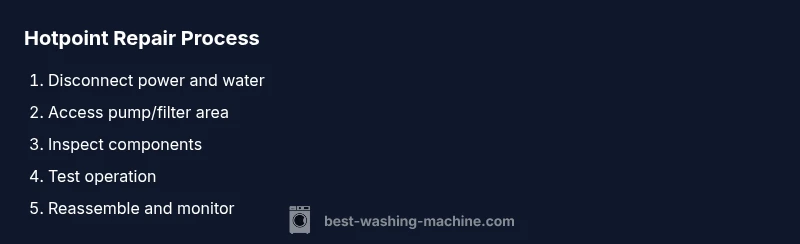
Estimated time: 60-120 minutes
- 1
Power down and unplug the washer
Unplug the machine from the electrical outlet and switch off the water supply. This prevents electrical shock and water spray during repair. Set a timer if you plan to follow a step-by-step workflow, so you don’t forget to recheck safety before testing.
Tip: Always assume the unit is live until you confirm no voltage with a multimeter. - 2
Move the washer and prepare your workspace
Carefully pull the machine away from the wall to access rear and side panels. Place towels and a bucket nearby to catch any drips. Clear the area of obstacles to prevent trips while you work.
Tip: Wear non-slip shoes and keep cords away from wet surfaces. - 3
Inspect hoses and external connections
Check inlet and outlet hoses for cracks, bulges, or leaks. Tighten hose clamps as needed and ensure the water supply lines are not blocked. If you find damage, replace the hose rather than attempting a temporary fix.
Tip: Replace hoses in pairs if you notice wear, to prevent future leaks. - 4
Open the access panel for internal components
Remove the back or bottom panel to reach the pump, filter, and lid switch. Note screw placement for reassembly. Take photos before disconnecting wires so you can match connectors on reassembly.
Tip: Label wires if you’re unsure of their connection order. - 5
Test the drain pump and filter
Locate and remove the pump filter; clean out debris. Manually spin the pump or apply a gentle current with a multimeter test if accessible to verify motor function. Ensure the pump housing is intact and seals are free of cracks.
Tip: Do not run the pump while your hands are inside the cabinet. - 6
Check the lid switch and wiring
Locate the lid switch and test continuity with the multimeter. If there’s no continuity when the lid is closed, the switch is faulty and should be replaced. Disconnect wiring, remove the switch, and install a compatible replacement.
Tip: Handle plastic components gently to avoid cracking the switch housing. - 7
Assess the belt and drive system (if applicable)
For belt-driven models, inspect the belt for cracks, fraying, or wear. Replace if needed and ensure proper tension. If you’re not sure of belt type or routing, consult the model manual to avoid incorrect installation.
Tip: A misaligned belt can cause poor spinning and clogs. - 8
Reassemble and perform a test run
Reconnect all wires, reattach panels, and restore water. Run a short cycle with an empty drum to observe operation. Check for leaks, verify draining, and listen for abnormal noises.
Tip: Start with a small test load to minimize water spillage and stress on new parts. - 9
Document results and plan next steps
Record the parts you replaced and any steps you took. If the problem persists, compare symptoms with the manufacturer’s manual and the Best Washing Machine guide to decide if professional service is needed.
Tip: Keep your notes for future reference and warranty considerations.
FAQ
Can I repair a Hotpoint washing machine myself?
Yes, many common issues can be fixed by homeowners with basic tools and careful steps. Start with safety checks, then inspect hoses, filters, and switches before replacing parts.
Yes—start with the basics and use the manual to guide your part replacements.
What tools do I need for Hotpoint repairs?
A standard toolkit with screwdrivers, pliers, a multimeter, and replacement parts compatible with your Hotpoint model will cover most DIY repairs.
A basic toolbox plus model-specific parts will handle most fixes.
How do I know if the lid switch is the problem?
Test continuity across the switch with the lid closed. No continuity indicates a faulty switch that should be replaced.
Test the switch with a meter; no continuity means replacement is needed.
Are hotpoint parts interchangeable between models?
Parts vary by model and series. Always verify compatibility using your model number and the official parts list.
Parts must match your exact model, so check the number before buying.
When should I call a professional?
If you encounter persistent fault codes, water leaks after repairs, or if the task involves high-voltage components, seek professional service.
If in doubt, or if safety is involved, contact a qualified technician.
What maintenance can prevent future breakdowns?
Regularly clean filters, inspect hoses, and avoid overloading the drum. Schedule periodic professional checkups for peace of mind.
Keep up with filters and hoses to prevent common issues.
Watch Video
The Essentials
- Follow a safe shutdown before any repair
- Diagnose by eliminating simple causes first
- Use model-specific manuals to identify parts
- Test all repairs with a controlled, empty load
- Know when to call a pro to protect safety and warranty