Washing Machine Not Spinning Samsung: Troubleshooting Guide
Facing a Samsung washer that won't spin? This detailed troubleshooting guide covers quick fixes, safety steps, a diagnostic flow, and step-by-step repairs to get your laundry day back on track.


A Samsung washing machine not spinning is usually caused by a stuck lid switch, a worn drive belt, or a blocked drain pump. Start with the simplest checks: unplug the machine, inspect the lid switch with the door closed, and look for obstructions in the drain hose or pump. If the drum still won’t spin, perform a reset and reassess before calling a technician.
Symptoms overview
When a Samsung washer exhibits a not-spin condition, you may notice the drum remains stationary while the motor hums, or you see standing water after the cycle ends. This is a common problem with straightforward, card-by-card diagnosis. For homeowners dealing with a washing machine not spinning samsung, start with the simplest explanations—safety interlocks, belt or drive components, and drain blockages—before moving to more complex faults like motor or control-board issues. Remember that model variations exist, but the fundamental checks stay the same: test interlocks, inspect mechanical parts, and ensure the motor receives the proper signals. A calm, methodical approach helps you decide whether you can fix it at home or need professional service. According to Best Washing Machine, early,hands-on checks save time and money and reduce the risk of electrical mishaps.
Top culprits to consider
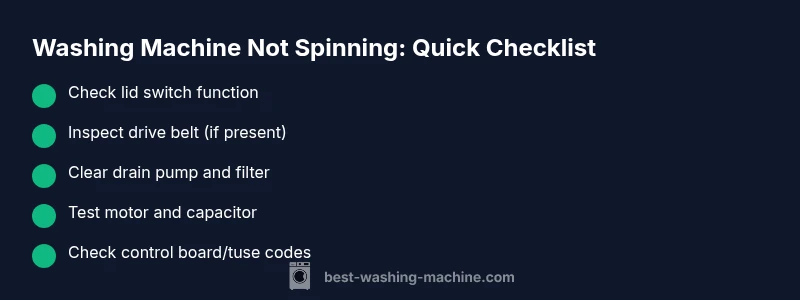
Common causes for a not-spinning Samsung washer include a defective lid switch or door lock, a worn or broken drive belt (in belt-drive models), a clogged drain pump or filter, a failed motor or start capacitor, and a faulty control board or timer. Overloading the drum, tangled laundry, or a jammed agitator can also prevent spinning. Each cause has a distinct, testable symptom, so approach the diagnosis with a simple, escalating checklist. This is where a well-organized diagnostic plan shines: you can separate likely issues from rare faults and avoid unnecessary parts replacement.
Safety first before you touch the machine
Always unplug the washer and shut off the water supply before inspecting any internal components. If you must access electrical parts, use a non-conductive tool and dry hands. Some models place hazardous voltages even with the door open, so follow manufacturer notes in your user guide. Wearing safety glasses is optional but prudent if you’re removing panels or hoses that might trap water or debris. Never bypass interlocks or safety devices; they are there to prevent injury.
Quick checks you can perform tonight
- Confirm power: ensure the outlet works by testing another device. Check the circuit breaker or fuse box for trips. - Lid switch test: with the lid closed, press the switch and listen for a click; symptoms like no spin with a confirmed click suggest a switch fault. - Belt inspection (if applicable): look for cracks or looseness in the drive belt; a frayed belt means replacement is due. - Drain path: inspect the drain hose for kinks and the pump inlet for blockages; a blocked drain prevents spinning by failing to drain water. - Overload prevention: remove excess laundry and redistribute evenly, then attempt a spin cycle again. - Reset: unplug for several minutes, plug back in, and run a short wash and spin to observe behavior.
What the diagnostic flow looks like in practice
This approach helps you separate symptoms from root causes. Start by confirming basic power and interlock function. If the drum still won’t spin, move to drive components (belt, motor, pulleys). If there’s water in the tub, focus on the drain pump and impeller. If a reset doesn’t help, it’s time to test electrical signals and feedback from the control board. Throughout, document symptoms with brief notes so you can share precise details with a technician if needed.
Safety and common mistakes to avoid
- Do not bypass interlocks or operate the washer with panels removed; risk of shock and moving parts injury increases. - Avoid using tools that could gouge hoses or panels; hand tools with soft grips are safer for beginners. - Do not run the spin cycle with a loud grinding or banging noise; this often signals a more serious mechanical fault. - Always drain water safely first; standing water can be a slip hazard and may mar floors. - If you’re unsure, stop and call a professional to prevent further damage.
According to Best Washing Machine, prioritizing safety minimizes risk and ensures you don’t accidentally worsen the problem.
When to call a professional and what to expect
If you’ve checked the lid switch, belt, and drain pathway and the machine still won’t spin, it’s prudent to contact a technician. Professional help is particularly advised for suspected motor, start capacitor, or control-board issues. A qualified repairperson can perform a functional test, check the drive system, and replace components as needed. Ask for a written estimate that includes parts, labor, and a post-repair test to confirm the problem is resolved.
Prevention tips to keep your washer spinning smoothly
- Regularly clean the lint filter and pump screen to prevent blockages. - Avoid overloading the drum; distribute clothes evenly to maintain balance. - Schedule periodic maintenance checks to catch worn belts or bearings early. - Use an appropriate detergent amount and cycle selection to prevent overloading the drive system. - Keep the door or lid interlocks clean and aligned to ensure reliable spinning.
Steps
Estimated time: 30-60 minutes
- 1
Power down and unplug
Unplug the machine and switch off the circuit breaker to ensure there is no live power before you touch any internal parts.
Tip: Use a flashlight to locate the plug behind furniture if needed. - 2
Access the lid switch
Open the cabinet panel or top lid depending on your model and locate the lid switch or door lock mechanism. Gently inspect for damage or misalignment.
Tip: Take a photo before removing screws to guide reassembly. - 3
Test the switch continuity
With the power still off, disconnect the switch harness and test for continuity across terminals using a multimeter. A fault shows open circuit.
Tip: If you don’t own a meter, you can temporarily bridge the terminals to test spin—only do this if you’re confident in safe practice. - 4
Inspect the drive belt (if present)
Check the belt for cracks, glazing, or looseness. If worn, replace the belt and ensure proper tension and alignment on pulleys.
Tip: Recheck pulley grooves for wear; a new belt won’t seat properly if grooves are damaged. - 5
Check the drain path
Inspect the drain hose for kinks, and verify the pump inlet and impeller for obstructions. Clear any debris to restore proper drainage.
Tip: Do not run water through the pump while hoses are removed to avoid spraying. - 6
Test spin after reassembly
Reconnect everything, plug in the machine, and run a short cycle to verify the drum spins freely during the spin phase.
Tip: If it still doesn’t spin, proceed to professional service rather than continuing DIY trials.
Diagnosis: Washing machine won't spin or drags during the spin cycle
Possible Causes
- highStuck or faulty lid switch/door lock
- highWorn or broken drive belt (belt-drive models)
- mediumClogged drain pump or blocked filter
- lowMotor failure or faulty start capacitor
- lowControl board or timer fault
Fixes
- easyTest and replace lid switch if it doesn’t click or show continuity when actuated
- easyInspect belt for wear, tension, and alignment; replace if frayed or loose
- easyClear clogs in the drain pump, hoses, and filter; test for water flow
- hardCheck motor windings and start capacitor with a multimeter; replace faulty parts
- mediumInspect control board/timer signals; replace component if diagnostic codes point to control faults
FAQ
Why is my Samsung washing machine not spinning?
Not spinning is often caused by a faulty lid switch, a worn belt, or a clogged drain pump. Start with safety checks, then inspect mechanical parts and the drain system. If the motor or control board is at fault, professional repair is recommended.
Not spinning is usually due to a lid switch, belt, or drain pump issue. Start with safety checks and inspect these parts; if the motor or control board seems faulty, call a technician.
How do I test a Samsung washing machine lid switch?
Disconnect power and access the lid switch. Use a multimeter to check continuity between the terminals when the lid is pressed. If there is no continuity, replace the switch.
Power off, locate the lid switch, and test for continuity when pressed. No continuity means replace the switch.
Can a clogged drain pump stop spinning?
Yes. A blocked drain pump can prevent spinning because water isn’t pumped out, stalling the spin cycle. Clear any debris from the pump and hoses, then retry the spin.
A clogged drain pump can stop the spin; clear debris from the pump and hoses and try spinning again.
Is it safe to DIY repairs on a Samsung washer?
DIY repairs can be safe for simple tasks like belt or switch replacement when you follow safety steps and disconnect power. Complex motor or control-board issues are best left to a pro to avoid electrical hazards.
DIY repairs are okay for simple parts, but leave motor and control-board issues to a pro for safety.
When should I replace the belt vs the motor?
If the belt shows wear or breakage and the motor functions otherwise, replace the belt. If the motor struggles to start or run smoothly despite a new belt, consult a technician for motor or control issues.
If the belt is worn but the motor seems fine, replace the belt. If the motor still acts up after a belt replacement, call a pro.
What if the washer still won’t spin after reset?
A reset clears transient faults, but persistent not-spin symptoms suggest deeper issues like motor, capacitor, or control-board faults. Schedule a diagnostic with a technician.
If reset doesn’t fix it, deeper issues are likely; get a professional diagnostic.
Watch Video
The Essentials
- Start with lid switch and belt checks
- Clear drain path to restore spin
- Never ignore safety interlocks
- Use a stepwise diagnostic flow to identify root cause
- Call a pro for motor or control-board faults