Why Your Washing Machine Isn’t Working: A Practical Troubleshooting Guide
Struggling with a washing machine that won’t start or run? This urgent troubleshooting guide from Best Washing Machine walks you through quick checks, a diagnostic flow, step-by-step fixes, safety tips, and when to call a pro.


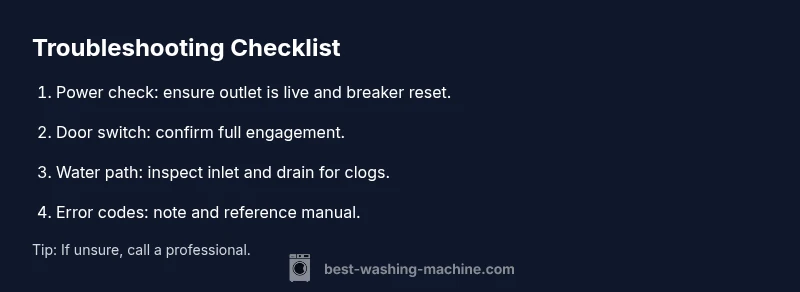
If your washing machine not working, start with the most common culprits: power and door latch. Check that the outlet is live, unplug for 60 seconds, and reset the breaker if needed. Ensure the door or lid switch is engaged—no wash cycle will start if the door is unsafe. This quick check often resolves the issue without tools.
Common Causes of a Non-Working Washing Machine
If you're wondering why washing machine not working, the root causes usually fall into one of a few buckets. The most frequent are electrical power problems, a faulty door or lid latch, a blocked inlet valve, or a failed start switch or control board. Less common but possible are a blown fuse in a nearby outlet strip, a tripped circuit breaker, or a loose connection behind the control panel. Understanding these categories helps you triage quickly. Start with safety: unplug the unit before inspecting any internal components; never probe live circuits. Also inspect the door or lid mechanism; if the machine detects the door is open, it will refuse to run. If you see error codes, record them for later reference—the codes often point to a draining pump, water inlet, or motor issue. By matching symptoms to likely causes, you can decide whether a quick reset fixes it or professional service is required.
Quick Checks You Can Do Right Now
Before dismantling anything, perform a few safe, simple checks that cover many everyday faults.
- Verify the outlet: plug a lamp into the same outlet to confirm power. If the lamp is dim or flickers, the circuit is weak or a GFCI outlet tripped.
- Check the circuit breaker: locate your home's breaker panel and reset any tripped breakers. Wait a minute, and try starting the washer again.
- Confirm door/lid engagement: press the door switch with your finger as the washer attempts to start; a stuck latch will block operation.
- Inspect hoses and water supply: make sure the hot and cold water taps are open, hoses aren't kinked, and the inlet filters aren't clogged.
- Look for obvious drainage or standing water: if the drum fills but never drains, focus on the pump, drain hose, or filter.
If these steps don't restore operation, consult the diagnostic flow or step-by-step fixes.
Diagnostic-Flow: Symptom to Diagnosis
Use a simple flow to classify the symptom and test plausible causes.
- Symptom: The washer doesn't start or respond. Diagnosis: Power or door latch is likely. Solutions: check outlet, reset breaker, test lid switch.
- Symptom: The drum fills with water but won't agitate. Diagnosis: Motor or drive belt issue. Solutions: reset, check for jammed load, inspect agitator.
- Symptom: The washer stops mid-cycle or won't drain. Diagnosis: Drain pump or filter jam. Solutions: clean pump, remove lint, check drain hose.
Follow this sequence: check basics, test for codes, then escalate to professional if unresolved. Record any error codes shown on the display.
When to Call a Professional
Certain problems require professional service to avoid injury or further damage:
- If you hear burning smells, see smoke, or notice arcing, unplug immediately.
- If the appliance is under warranty and issues involve electronics or the motor, contact the manufacturer or a licensed tech.
- If the diagnosis involves the control board, high-voltage components, or the pump under water, professional intervention is advised.
Scheduling a pro is usually recommended when simple resets do not restore function, when error codes point to hardware failure, or if disassembly is beyond your comfort level.
Safety Notes and Common Mistakes
Safety first: always unplug before any inspection. Keep water away from electrical outlets. Do not bypass door locks or fuse components. Use the right tools to avoid shock or injury.
Common mistakes include ignoring warning codes, forcing components, or not draining residual water before opening the unit. A quick note: take photos as you disassemble to help a tech.
Steps
Estimated time: 45-60 minutes
- 1
Power check and reset
Unplug the washer, wait 30-60 seconds, then plug it back in and attempt to start a cycle. If the outlet or circuit is faulty, this often restores power flow and clears minor glitches.
Tip: Use a known-good outlet to verify power; avoid using extension cords for washing machines. - 2
Test the door lid switch
Close the door firmly and press the lid switch while attempting to start a cycle. A faulty switch will block operation even if power is fine. If the switch feels loose or sticks, it may need replacement.
Tip: Listen for a click when you press the switch; no click usually means a bad latch. - 3
Check circuit protections
Inspect the home breaker panel for tripped breakers and reset them. If you have a GFCI outlet nearby, test and reset it as well. A tripped protection can cut power to the washer without any obvious signs.
Tip: Move other appliances off the same circuit during testing to avoid overload. - 4
Inspect water inlet and drain paths
Make sure water taps are open and hoses aren’t kinked. Check the inlet filters for debris and clear any blockages. If the drain hose is clogged, water may back up and prevent cycles from starting.
Tip: Never pull hoses forcefully; release clamps gently to avoid leaks. - 5
Read error codes and reset
If the display shows fault codes, note them down and consult the manual or quick guide to map codes to subsystems. Perform a soft reset by unplugging for 60 seconds, then power on and run a test cycle.
Tip: Keep a small code log for future troubleshooting or technician reference. - 6
Decision point
If the machine still won’t start after these steps, the fault likely lies with the control board, motor, or pump. In this case, schedule professional service to avoid electrocution or further damage.
Tip: Document all steps you performed and any error codes observed.
Diagnosis: Machine won't start or respond
Possible Causes
- highPower issue
- highDoor/lid latch fault
- mediumControl board error
- lowOverloaded circuit
Fixes
- easyTest the outlet with a lamp or multimeter; plug the washer into a known-good outlet if possible
- easyReset the circuit breaker and wait a moment before retrying
- easyInspect the door/lid latch and ensure it fully engages; replace if damaged
- mediumIf error codes indicate electronic failure, contact a professional technician
- easyUnplug for 60 seconds and plug back in to reset the microcontroller
FAQ
Why won't my washing machine start even when it's plugged in?
Power outlets can fail or trip breakers. Check the outlet with another device, reset the breaker, and verify the door latch is engaged. If it still won’t start, the issue could be a faulty lid switch or control board.
Check the outlet and door latch first; if it still won’t start, you may have a faulty lid switch or control board.
Why is my washer filling with water but not washing?
If the drum fills but doesn’t agitate, the issue could be with the motor, belt, or transmission. Ensure the load isn’t jammed, and listen for a buzzing sound that signals the motor trying to start. If the problem persists, a professional should inspect the drive system.
If it fills but won’t agitate, the motor or drive system may be failing. A technician should check the belt and motor.
My washer won’t drain. What should I do?
Check the drain hose for kinks and the pump filter for clogs. Ensure the pump is functioning by listening for a hum or removing debris manually if safe. If water remains in the drum after a cycle, a blockage is likely.
Check the drain hose and pump for blockages; clear debris if safe to do so.
What do error codes mean on a washing machine?
Error codes identify specific subsystems like water inlet, drain, or motor. Refer to the user manual or quick guide for the exact code meaning and recommended action, then perform a soft reset if advised.
Error codes map to parts like inlet, pump, or motor. Check the manual for specifics and reset if advised.
Should I repair or replace my washing machine?
If repair costs exceed half of a comparable new unit or the machine is old and inefficient, replacement may be more economical. Consider warranty coverage and ongoing energy use when deciding.
If repairs would cost more than a new unit or the machine is old, replacement is often the smarter choice.
Watch Video
The Essentials
- Start with power and door latch checks.
- Follow the diagnostic flow before calling for help.
- Use the step-by-step guide to safely pinpoint issues.
- Call a professional for electrical or motor faults.