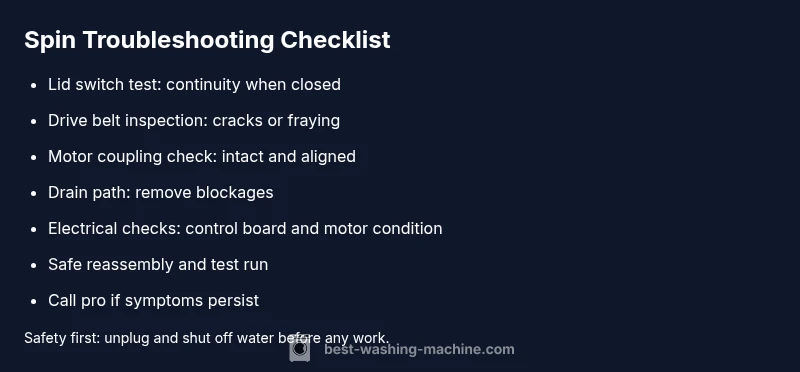
Why is My Washing Machine Not Spinning? A Troubleshooting Guide
Urgent guide to diagnose and fix a washer that won't spin. Safe checks, common causes, and DIY steps to get your laundry moving again.


The most likely reason your washing machine isn’t spinning is a failed lid switch or a jammed drum caused by a clogged drain or a blocked impeller. Start by checking the lid switch safety interlock and ensuring the drum can rotate freely, then verify the drive belt and motor coupler if present. If the issue persists, consult a repair technician.
Quick diagnostic mindset: approach to not spinning
When a washer won’t spin, it’s easy to panic. But most spin failures follow a repeatable sequence: verify safety switches, check the most obvious mechanicals, then test electrical components. This calm, methodical approach helps you identify the root cause quickly without guessing. According to Best Washing Machine, most spin problems originate from a few common culprits: lid switch issues, belt or coupler wear, or simple blockages that keep the drum from turning. Keep safety at the forefront: unplug the unit, shut off the water, and work on one potential cause at a time. By staying organized, you can determine whether a DIY fix is feasible or if it’s time to call a pro.
Check the basics first: power, door lock, and load
Before you assume a hidden fault, confirm the simplest things are in order. Ensure the machine is unplugged, the outlet works, and there isn’t a blown circuit. Check the lid or door interlock—many models won’t spin if the lid is not properly closed or if the switch is defective. Then look at the load: an unbalanced basket can trigger spin halt in some models. Finally, make sure the drain is clear and the drum isn’t blocked by a foreign object. These quick checks resolve many spin failures and protect against unnecessary repairs.
Common mechanical failures: lid switch, drive belt, and motor coupler
The next layer of checks focuses on mechanical components that are common failure points. A faulty lid switch prevents the spin motor from engaging. On belt-driven models, a worn or broken drive belt is a frequent cause of no-spin. Direct-drive machines may rely on a motor coupler; when it wears, the drum won’t spin even if the motor runs. Other mechanical issues include worn pulleys, a seized drum due to foreign debris, or a faulty clutch in certain models. Visual inspection and gentle testing can reveal obvious wear or breaks.
How to test the lid switch and door interlock safely
Lid switches are typically engaged when the lid is closed. To test safely, unplug the unit and locate the switch, often near the top front panel. Use a multimeter to check for continuity when the lid is closed. If continuity isn’t present, replace the switch. For some models, you can temporarily bridge the switch to test spin, but only do this if you understand the risks and always reassemble properly afterward. Safety first: never test live circuits.
Inspect the drive system: belt, pulley, and transmission
If you have a belt-driven washer, inspect the drive belt for cracks, fraying, or stiffness; replace if worn. Check the pulley for wobble or looseness. For direct-drive machines, inspect the motor coupling or transmission coupling for wear or breakage. A slipped or broken belt or coupler will prevent the drum from spinning even when the motor runs. Replacing these parts requires basic hand tools and careful alignment; consult your user manual for exact steps.
Diagnosing electrical faults: timers, control board, and motor
If the mechanicals check out, the problem may be electrical. Faulty timers or electronic control boards can fail to trigger the spin cycle. A motor with worn windings or overheating issues can also stall. Look for burnt smells, obvious damage, or error codes on the display. If you see code indicators, refer to the manual to interpret them and decide whether a software reset or a component replacement is needed. When in doubt, test components with a multimeter or seek professional electronics service.
Step-by-step fixes for the top 3 causes
The three most common spin failures are lid-switch faults, drive-belt problems, and motor coupler wear. To fix: (1) replace a faulty lid switch with a model-matched part; (2) replace a worn belt and re-tension properly; (3) replace a damaged motor coupler and re-check alignment. After any repair, reassemble, plug in, and run a test cycle with a small load. If the drum spins normally, you’ve likely solved the issue and protected fabric care.
When to call a pro and what to expect
If you’re uncomfortable with electrical tests, or if you’ve performed the above steps and the washer still won’t spin, it’s time to contact a professional. A technician can safely diagnose deeper electrical faults or transmission issues and verify that the repair doesn’t void warranty terms. Expect a diagnostic fee plus the cost of replacement parts. For many households, this is a cost-effective option to prevent further damage and ensure safe operation.
Steps
Estimated time: 60-90 minutes
- 1
Power down and safety check
Unplug the washer and shut off the water supply. Remove all clothes from the drum and place them in a safe area. This prevents accidental startup and reduces the risk of leaks or electric shock during inspection.
Tip: Take a photo of the control panel before you start to help with reassembly. - 2
Access the drive area
Lid off or panel removed, locate the drive belt and pulleys. For direct-drive machines, locate the motor coupling. Ensure you have good lighting and a towel to catch any residual water.
Tip: Use a magnetic tray for small screws to avoid losing parts. - 3
Test the lid switch
Disconnect wiring as needed and use a multimeter to test for continuity when the lid is closed. If no continuity, replace the switch following the manufacturer’s instructions.
Tip: Always de-energize the unit before testing electrical components. - 4
Inspect and replace the drive belt
Check the belt for cracks or fraying. If damaged, remove the old belt and install a new one with correct tension. Spin the drum manually to verify it rotates smoothly.
Tip: Ensure the belt sits properly in all grooves after replacement. - 5
Check motor coupling or transmission
Inspect the coupling or transmission for wear or cracking. If you see damage, replace with compatible parts and verify alignment.
Tip: Only perform this step if you’re comfortable with the mechanical layout of your model. - 6
Clear the drain path
Inspect the drain hose and pump for blockages. Remove debris, clean the filter, and ensure the pump can evacuate water during the spin cycle.
Tip: Keep a bucket handy for water drainage during this step. - 7
Reassemble and test run
Reconnect all wires, replace panels, plug in, and run a test cycle with a light load. Listen for abnormal noises and watch for proper spinning.
Tip: Run with a small load first to verify stability before full usage. - 8
If it still won’t spin
Power down again and prepare for professional service. A pro can diagnose hidden electronics or internal transmission faults that aren’t user-serviceable.
Tip: If under warranty, contact the manufacturer or authorized service partner.
Diagnosis: Machine won't spin or agitate during the wash cycle
Possible Causes
- highLid switch/interlock fault
- mediumWorn or broken drive belt (belt-driven models)
- mediumMotor coupling worn or broken (direct-drive models)
- lowDrain pump or filter blocked causing spin to stall
Fixes
- easyTest and replace lid switch/interlock if faulty
- easyReplace drive belt; re-tension and align pulleys
- mediumReplace motor coupling if present and accessible
- easyClear drain pump and filter blockage; ensure proper drainage before spin
FAQ
What is the most common reason a washer won't spin?
The lid switch or drive belt failure is the most common cause, especially on older or belt-driven models. Other frequent culprits include detritus in the drain path and worn motor couplers.
Usually a faulty lid switch or belt causes spin failure, with belt-driven models most at risk.
Can I fix it myself?
Many spin issues are DIY-friendly if you’re comfortable with basic tools and electronics. Start with safety checks, then replace simple parts like lids switches or belts.
Yes, many fixes are doable at home, but skip complex electronics if you’re unsure.
How do I test the lid switch?
Use a multimeter to check for continuity when the lid is closed. If there’s no continuity, replace the switch. Always unplug before testing.
Check lid switch continuity with a meter and replace if faulty.
When should I call a professional?
If you can’t identify the issue, or if you notice burning smells, sparks, or water leaks, it’s best to consult a professional.
Call a pro if there are electrical signs or if the unit is under warranty.
Is it safe to run the washer if it won’t spin?
Avoid running with known spin faults. It can damage the motor, belt, or electronics and void warranties.
Don’t run it when you know there’s a fault; risk of further damage.
Watch Video
The Essentials
- Check lid switch first; it’s the top spin culprit
- Replace worn belts or couplers to restore motion
- Clear drain path to prevent spin stall
- Test safely and call a pro for electrical issues
- Maintain your washer to prevent future spin problems