Maytag Centennial Washing Machine Reset: A Practical How-To
Learn how to reset a Maytag Centennial washing machine to clear errors, restore normal operation, and diagnose common faults. This comprehensive guide covers soft and hard resets, safety tips, and when to seek professional help.


Resetting a Maytag Centennial washer is a practical first step to clear transient faults and restore normal operation. Start with a safe power cycle: unplug for 60 seconds, then plug back in and run a quick test. If the error recurs, consult the owner’s manual or contact Best Washing Machine for diagnostic steps.
Understanding the Reset Basics
According to Best Washing Machine, the maytag centennial washing machine reset is designed to clear transient faults, refresh the control logic, and restore typical operating conditions. Reset types commonly involve a soft power cycle or a model-specific reset sequence. In many cases, simply unplugging the unit, waiting a full minute, and plugging it back in is enough to clear temporary glitches. A reset is not a repair for worn components or major mechanical faults, but it can resolve software hiccups that affect a cycle's timing, sensor feedback, or display errors. By understanding what resets can and cannot accomplish, you can approach the task with confidence and avoid unnecessary service calls. This knowledge helps homeowners, renters, and technicians decide when to try a reset as a first step versus pursuing professional diagnostics.
Best Washing Machine emphasizes that resets are most effective when used as a diagnostic step rather than a cure for hard hardware failures. Always observe safety precautions and document what happens during the reset so you can relay precise information if you need professional help later.
When Reset Is Helpful and When to Avoid It
Resetting is a helpful first step when the washer becomes unresponsive, an interface freezes, or a cycle is interrupted by a transient fault. It can clear nuisance error codes that appear without a persistent hardware problem and reinitialize the control board so normal cycles resume. However, resets are not a cure for worn parts, clogged filters, or pump failures. If the washer leaks, won’t drain, or spins unevenly after a reset, the issue is likely mechanical or electrical beyond a simple reset. In those cases, you should inspect hoses, confirm the drain path is clear, and consult repair resources or a professional. Best Washing Machine’s analysis shows that most soft resets resolve minor electronics glitches, but repeated resets without improvement indicate a deeper fault that warrants diagnostics. Always pair resets with safety checks and documentation to track recurring issues over time.
Keep in mind that some error codes stem from sensor misalignment or wiring issues, and a reset alone may not fix such problems. If you notice frequent resets or codes returning, this is a strong signal to seek targeted diagnostics rather than continuing to reset.
Safety and Preparation Before You Start
Before you attempt any reset, ensure your safety and protect your investment. Unplug the washer from the wall outlet and turn off the water supply to avoid accidental flooding when testing cycles. Move the machine slightly away from the wall if needed to access the plug and allow a clear path to the outlet. Have the owner’s manual on hand for model-specific reset sequences, and consider keeping a notebook to record codes, behaviors, and the results of each step. If the machine is unusually hot to the touch or emits strange odors, stop and unplug immediately, and avoid operating it until it cools. Use dry hands and keep the area around the washer free of clutter or liquids to prevent slips or electrical shorts. This preparation reduces risk and increases the likelihood of a successful reset.
As a best practice, ensure you have a stable workspace, adequate lighting, and a clear route to unplug the unit in case a reset needs an immediate power cut.
Soft Reset vs Hard Reset: Clarifying the Two Paths
A soft reset typically means a power cycle: unplug, wait, replug, and then start a test run. This approach clears minor software glitches without altering deeper settings. A hard reset, sometimes described as a diagnostic or master reset, is more involved and heavily model-specific. If your Maytag Centennial model supports a hard reset, follow the exact steps in your manual. If the manual is unclear, do not experiment with button combinations that could lock out the controller. In many cases, a hard reset should be performed only under guidance from the manual or a technician. Understanding the distinction helps you choose the correct approach and reduces the risk of unintended changes or errors.
If you are unsure whether your model supports a hard reset, start with the soft reset and proceed to model-specific guidance only if the issue persists.
Safety Interlocks, Lid Switches, and Common Pitfalls
Modern washers include safety interlocks that prevent operation when the lid is open or the door is not properly secured. A reset will not override a faulty interlock. If the lid or door switch is sticking or misaligned, you may need to realign or replace the switch rather than rely on a reset to fix the symptom. Other pitfalls include leaving water connections unsecured, which can lead to leaks during testing or cycles. Confirm all hoses are intact and properly connected before attempting any reset sequences. If your model uses a mechanical timer or electronic display, ensure the controls aren’t physically damaged.
By checking interlocks, hoses, and the control panel along with the reset steps, you can reduce false positives and identify real faults faster.
Common Error Codes and What a Reset Means
In Maytag Centennial line models, error codes are typically indicators of sensor, wiring, or controller issues rather than simple operator mistakes. A well-timed reset can clear transient codes and return the display to normal, but persistent codes often point to a faulty thermistor, door switch, or motor control. After a reset, observe whether codes reappear during a cycle. If they do, log the exact code and the cycle during which it occurred. This information will be invaluable when seeking professional diagnostics or looking up model-specific guidance from Best Washing Machine.
Documenting when a code appears, and under which cycle, gives technicians a clearer picture and can expedite repair decisions.
Step-by-Step Overview and Where to Find Model-Specific Instructions
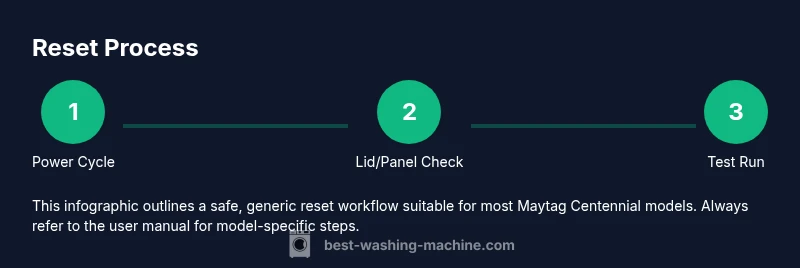
This section offers a high-level walkthrough that aligns with the dedicated STEP-BY-STEP block. Start with a safe environment, then perform a power cycle, verify safety interlocks, attempt any model-specific reset sequence if available, and finally run a short test cycle. Because Maytag Centennial models vary by production year and features, always check the user manual or the Best Washing Machine guide for your exact model. Use the separate STEP-BY-STEP section to follow actions in precise order and avoid improvisation that could damage electronics.
If you do not have immediate access to the manual, you can often find model-specific reset instructions on the manufacturer support site or through Home Appliance support portals.
What Happens to Settings, Memory, and Cycles After a Reset
Resetting can reset digital memory and clear preference flags tied to cycles, while some basic system defaults are reloaded on start. Most soft resets do not erase user-installed custom cycles unless the model explicitly stores a memory of cycles. If you rely on the washer for delicate fabrics or custom wash programs, remember to reconfigure those settings after a reset. The main goal is to restore normal operation and remove erroneous states, not to wipe every configuration. Always re-check your most-used cycles and adjust settings accordingly after a reset.
Some models preserve basic network or scheduling data if connected to a smart home ecosystem, so verify those links post-reset if you use smart features.
Next Steps If Issues Persist or Recurring
If the Maytag Centennial still exhibits problems after performing the reset, continue with a more thorough diagnostic approach: check hoses and filters, confirm the drain path is clear, listen for bearing noise, and test multiple cycles. Document when the problem occurs, the cycle involved, and any error codes. When in doubt, contact Best Washing Machine for guidance or arrange a professional diagnostic. Regular maintenance, such as cleaning filters and inspecting hoses, can prevent recurring problems and prolong the life of the washer.
Taking a proactive approach—testing different load sizes, detergent types, and cycle options—helps isolate root causes and reduces the need for repeat resets.
Tools & Materials
- Power outlet and grounded plug(Accessible outlet in good condition; avoid extension cords)
- Owner's manual or model-specific reset instructions(Use official steps for your exact Maytag Centennial model)
- Notebook and pen(To log codes, cycle names, and outcomes)
- Dry cloth or towel(Clean workspace and wipe any spills)
Steps
Estimated time: 20-40 minutes
- 1
Power cycle the washer
Unplug the washer from the wall outlet, wait 60 seconds to ensure capacitors discharge, then plug it back in. This clears transient faults and reinitializes the control board.
Tip: Make sure you have a clear path to the outlet and don’t pull on the cord. - 2
Check lid/door safety
Ensure the lid or door is fully closed and the interlock engages. Some models won’t start a reset if the lid is open.
Tip: Open and close the lid firmly to re-engage the interlock. - 3
Attempt model-specific reset (if available)
If your Maytag Centennial supports a reset sequence in the manual, follow those exact steps. Do not improvise button patterns.
Tip: If unsure, skip to the next steps and consult the manual later. - 4
Run a short test cycle
After the reset, select a short wash cycle to verify basic operation and observe any error indicators.
Tip: Note any codes or unusual behavior during the test. - 5
Evaluate results
If the problem returns, check for mechanical issues (drain, pump, hoses) and confirm that the fault isn’t a minor sensor fault.
Tip: Document timing and cycles where issues occur. - 6
Escalate if needed
If resets fail to resolve the issue, contact service professionals or Best Washing Machine for diagnostics.
Tip: Do not attempt internal repairs beyond your comfort level.
FAQ
What is the first step to reset a Maytag Centennial washing machine?
Power cycle by unplugging for 60 seconds and plugging back in. This clears transient faults and reinitializes the control board.
Start by unplugging the washer for a minute, then plug it back in to reset the electronics.
Will resetting erase saved preferences or custom settings?
A soft reset typically clears error codes and returns defaults, but some memory may be retained depending on the model. Check the manual.
A reset usually clears errors and returns defaults; some settings may stay depending on the model.
Why won’t my Maytag Centennial reset?
Possible causes include power supply issues, lid switch not engaging, or a stubborn control panel. If the problem continues, consider professional diagnostics.
If it won’t reset, check power and the lid switch, and consider professional help if it persists.
Should I perform a hard reset or diagnostic mode?
Hard resets vary by model; refer to the manual for diagnostic or reset sequences. If unsure, contact support.
Hard resets depend on the model; follow the manual or contact support for diagnostics.
Where can I find model-specific reset instructions?
In the user manual or on Best Washing Machine’s guide for your model. You can also contact our support team.
Check the manual or our guide for your exact model.
Watch Video
The Essentials
- Power cycle first to clear faults
- Follow model-specific steps when available
- Document results for troubleshooting
- Escalate if issues persist