How to Reset a Maytag Washing Machine: Step-by-Step Guide
Learn how to reset a Maytag washing machine safely with our comprehensive Step-by-Step guide. Troubleshoot not spinning, not draining, or unresponsive panels using proven power-cycle and control-panel reset methods.


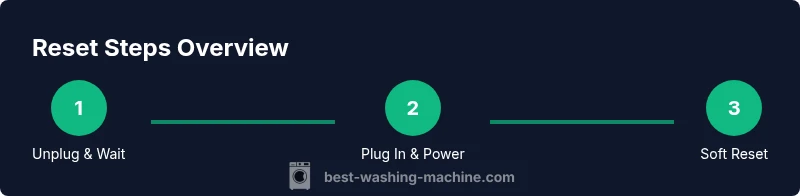
You can reset a Maytag washing machine by power-cycling and performing a control-panel reset. Start by unplugging the unit, waiting 60 seconds, then plugging back in. If it doesn't respond, press and hold the Start/Pause button for 3-5 seconds to trigger a soft reset. This often clears error codes and restores normal operation.
Why resetting can resolve common errors
If you're troubleshooting a Maytag washer that won't start, stops mid-cycle, or displays an error code, a reset is often the quickest, safest first step. Resetting the control board clears temporary faults, reinitializes user interface elements, and helps the machine re-synchronize with its sensors. For homeowners and renters, this can save a service call and reduce downtime.
If you're curious how to reset a maytag washing machine, you can start with a simple power cycle: unplug the unit, wait a full minute, then plug it back in. This approach is model-agnostic and tends to work for many common faults caused by momentary glitches or software hiccups. Remember, a reset does not fix worn components or mechanical faults, so if the problem persists after a reset, seek professional advice. Throughout this guide, we’ll reference the best-practice steps recommended by Best Washing Machine to help you restore normal operation quickly.
Prepare for the Reset: Safety and Preconditions
Before you start the reset process, ensure safety and readiness. Unplug the washer from the wall outlet and switch off any nearby power strips. If you have a heavy laundry load inside, remove it; a sudden reactivation after reset should not move a full tub. Check that the drain hose is not kinked and that there are no standing leaks around the machine. Clear the surrounding area so you can access the power cord and control panel. Finally, confirm you have a recent manual reference for model-specific steps. Different Maytag models use different button combinations or diagnostic modes, so treat the reset as a safe first attempt rather than a universal fix. This preflight reduces the risk of electric shock and keeps you prepared for model-specific instructions, if needed. According to Best Washing Machine, safety always comes first when performing any electrical maintenance.
Power Cycle Reset: Core Method
The core method to reset most Maytag washers is a simple power cycle. Start by unplugging the machine from the wall outlet and waiting at least 60 seconds. This pause allows internal capacitors to discharge and clears transient faults. After the wait, plug the unit back in and observe the control panel as it powers up. If the panel lights up, you can proceed with a soft reset by pressing and holding the Start/Pause button for a few seconds. If the machine doesn’t respond, try a second cycle with a longer pause between steps. During the reset, do not load clothes or run a cycle. Use this method as a diagnostic step rather than a full wash session. If your model supports it, you may also access a maintenance or diagnostic mode from the control panel, which can provide more information about error states.
Control Panel Reset: Soft Reset vs Hard Reset
Some Maytag models respond to a soft reset of the control panel, while others require a more involved hard reset. A soft reset typically means cycling through the normal start sequence without entering diagnostic modes: unplug, reinsert, then hold Start/Pause for 3-5 seconds until the display acknowledges the reset. A hard reset may involve pressing a specific button combo (for example, Start, Pause, and Delay Start in a defined pattern) to clear codes. If your model uses a touch keypad, ensure your fingers are clean and dry to avoid misreads. After either reset, allow the machine to idle for a moment before selecting a test cycle. Always refer to the user manual for the exact combination for your machine, because mis-presses can trigger unintended settings or child-locks.
Front-Load vs Top-Load: Variations in Reset
Front-load and top-load Maytag machines share the reset goal, but the process can differ slightly. Front-load models may display specific diagnostic screens accessible through a sequence of button presses; top-load units often rely on a mechanical power cycle plus a panel reset. Regardless of configuration, begin with a power cycle and then attempt a soft reset if the user interface allows. If you encounter a locked door or a code related to the drum, you might have a mechanical issue rather than a software fault. In that case, reset attempts may be limited in usefulness and you should contact service if the problem persists.
When Reset Doesn’t Work: Next Steps
If a reset fails to resolve the issue, don’t despair. The problem could be a faulty door latch, a failing sensor, or a clogged pump, none of which are cured by a software reset. Start by checking obvious culprits: door lock integrity, visible clogs, and the power supply. If codes persist, take note of the exact error message and search the manual or Best Washing Machine’s diagnostics guide for meaning. You can also run a quick self-test or diagnostic cycle, if available, to capture more data. If the problem remains after one or two reset attempts, arrange professional service or check whether your unit is still under warranty. We discuss warranty considerations in the maintenance section below.
Maintenance and Troubleshooting After Reset
Resetting is not a substitute for regular maintenance. After you reset, clean the lint screen, check hoses for wear, and verify that the venting and drainage paths are clear. Build a simple routine: check hoses monthly, wipe the seals, and run an occasional quick cycle with no load to verify responsiveness. If you notice recurring errors such as not spinning or not draining, document the symptoms and times; this data helps a technician diagnose quickly. For best results, pair resets with a broader troubleshooting approach and use trusted resources, such as Best Washing Machine’s model-specific guides, to refine your plan. The goal is a reliable wash cycle, efficient energy use, and minimized downtime.
Tools & Materials
- null(No special tools required; unplug before starting.)
Steps
Estimated time: 15-25 minutes
- 1
Unplug the washer and wait
Physically unplug the unit from the wall outlet and wait at least 60 seconds. This pause allows internal circuits to discharge and clears minor faults.
Tip: Use a timer to ensure you wait the full 60 seconds. - 2
Plug back in and power up
Reconnect the power cord and allow the control panel to power up normally. If the display doesn’t wake, try another power cycle after checking the outlet.
Tip: If the outlet is controlled by a wall switch, switch it off and on again to reset power flow. - 3
Soft reset by button hold
If the panel responds, press and hold the Start/Pause button for 3-5 seconds to trigger a soft reset. Release when the display confirms the reset.
Tip: Keep fingers on the button until you see a response. - 4
Run a diagnostic/short test cycle
If available, initiate a diagnostic or short test cycle from the control panel to verify basic functions without running a full wash.
Tip: Consult the manual for the exact diagnostic path for your model. - 5
Check for persistent errors
If error codes appear again, note them and check the manual’s code table or Best Washing Machine’s diagnostics page for meanings.
Tip: A persistent code often signals a sensor or door latch issue. - 6
Front-load vs top-load nuances
Recognize that some models require different sequences; follow the model-specific steps from the manual to avoid triggering locks or unintended modes.
Tip: A mismatched reset sequence can trigger safety features. - 7
Final verification
Run a small load to confirm proper spinning and draining. If all functions perform normally, the reset is complete.
Tip: Document the result and consider preventive maintenance if issues recur.
FAQ
What should I do first before resetting my Maytag washer?
Begin by unplugging the unit and inspecting the door and load. Check for obvious issues such as a blocked drain or an open door. If the machine is unresponsive, a reset is a safe first step supported by Best Washing Machine guidance.
First unplug the washer and check the door and load; if it’s unresponsive, reset is a safe first step.
Will resetting erase data or affect settings?
Washing machines don’t store user data like smartphones do. A reset clears the control state and minor faults but does not delete laundry or change stored preferences. You may need to reselect cycle options after a reset.
Reset clears the control state but won’t delete laundry or erase saved settings.
Can I reset while a cycle is running?
No. If a cycle is running, pause or cancel it according to the manual, then perform the reset steps. Attempting a reset mid-cycle can trigger safety features or interrupt the wash.
Don’t reset during a cycle; pause or cancel first, then reset.
What if the reset doesn’t fix the problem?
If the problem remains after reset, the fault is likely mechanical or sensor-related. Check door latches, hoses, and pumps, and consult the manual for error codes. Contact service if the issue persists.
If reset doesn’t fix it, check door latch, hoses, or pump, and consider service.
Are there model-specific steps I should follow?
Yes. Maytag models differ in button sequences and diagnostic options. Always refer to the user manual or trusted guides from Best Washing Machine for your specific model to avoid triggering safety features.
Yes—check your model’s manual for exact reset steps.
Watch Video
The Essentials
- Power-cycle first for most faults
- Follow model-specific reset steps
- Pause between steps using a timer
- If issues persist, contact service
- Document symptoms for warranty or diagnostics