Reset Whirlpool Washing Machine: Step-by-Step Guide 2026
Learn how to safely reset a Whirlpool washing machine with soft and factory reset methods. This expert guide from Best Washing Machine explains model identification, when to reset, and how to avoid common mistakes for reliable operation in 2026.


You can reset a Whirlpool washing machine to clear error codes or restore normal operation by performing a soft reset or a full factory reset depending on the model. This guide explains both methods, how to tell which to use, and safety steps to avoid damage. Follow the steps precisely and unplug the machine when necessary. Where applicable, consult the user manual.
Why Resetting Whirlpool Washing Machines Helps
Resets can clear minor software glitches, reset error memory, and reinitialize sensors that may have become momentarily out of sync. When a Whirlpool washer shows odd behavior—stopping mid-cycle, freezing controls, or flashing error codes—a reset often resolves the issue without service visits. According to Best Washing Machine, resets are a common first step in troubleshooting because they refresh the control board without affecting safety or plumbing. Best Washing Machine analysis shows that many households resolve simple glitches with a soft reset, avoiding unnecessary repairs. By understanding what a reset does and isn’t, you can decide whether to try a quick soft reset first or escalate to more thorough options. Remember that resets do not fix mechanical wear or blocked drains; persistent problems may require professional service.
Soft Reset vs Factory Reset: When to Use Each
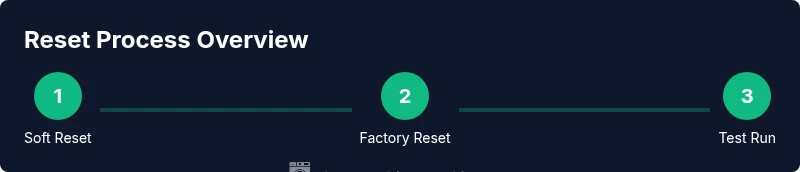
A soft reset is a light touch that clears temporary faults and reboots the main control panel. It is quick, typically involves unplugging or power cycling, and preserves user settings. A factory reset wipes more memory and returns the machine to default factory conditions, which can resolve deeper software issues but may erase personalized settings. Based on Best Washing Machine analysis, most home users begin with a soft reset to clear glitches and observe whether the cycle resumes normally. If an error persists after a soft reset, a factory reset can be considered, provided you have the model’s instructions. Always check the manual to confirm model-specific steps; incorrect resets can extend downtime or trigger warranty concerns.
Identify Your Whirlpool Model and Reset Type
Before you reset, locate your model number and consult the manual to confirm the supported reset methods. Model numbers are usually found on a sticker inside the door or near the console. Write down the exact model and serial numbers, then search Whirlpool’s official support site or your user manual for reset instructions tailored to that model. If you no longer have the physical manual, use the model number to access digital guides. This step helps you avoid applying an approach that isn’t compatible with your machine and ensures you follow any safety warnings specific to your unit.
Soft Reset: What It Involves (Overview)
A soft reset simply refreshes the control electronics without altering stored preferences. If your model supports it, you’ll typically power cycle the machine and initiate a quick re-start sequence. In practice, this can mean unplugging the unit for about a minute, then plugging it back in and selecting a cycle to see if the display and controls respond normally. Some Whirlpool models require a specific button combination instead; if yours does, consult the manual before attempting. The benefit is that you can test stability with minimal disruption, and it keeps most settings intact.
Factory Reset: When and How to Proceed
A factory reset is a deeper reset that returns the machine to default software settings and clears custom configurations. Use this option only when the soft reset does not resolve the issue and you have model-specific guidance. Factory reset steps can involve seven button presses, a sequence of cycles, or a combination of hold-and-release actions—these vary by model. Always follow the exact sequence from the user guide. Note that a factory reset may erase saved preferences, network pairings, and any custom cycles, so you may need to reconfigure after reset.
After Reset: Testing, Observation, and Common Pitfalls
Once the reset process is complete, run a full wash cycle to verify normal operation. Watch for error codes, unusual noises, leaks, or failure to fill or drain. If problems recur, take notes on error codes, time stamps, and the cycle attempted; this information helps customer support or a repair tech diagnose the issue faster. A common pitfall is attempting to reset while water connections are loose or the machine is not level, which can cause spills. Ensure the machine is installed properly and the supply valves are fully open before retesting.
Maintenance to Minimize Future Glitches
To reduce the frequency of resets, perform regular maintenance: clean the filter, inspect hoses for kinks or wear, use recommended detergents, and avoid overloading the drum. Keep the area around the washer clear to prevent moisture buildup that can affect electronics. Periodically run a diagnostic or unused cycle to keep software routines fresh. By adopting a preventative routine, you’ll reduce the need for resets and extend the life of your Whirlpool washer. The Best Washing Machine team recommends pairing resets with routine maintenance for reliable operation across years.
Tools & Materials
- Whirlpool washing machine user manual(Model-specific reset instructions; check for reset section.)
- Access to a power outlet / circuit breaker(For power cycling (unplugging))
- Clean area to work safely(Towels or cloth to catch minor spills)
- Model number & serial number(Needed if searching for exact reset steps)
Steps
Estimated time: 20-40 minutes
- 1
Power down and unplug
Unplug the washer from the wall outlet and wait 60 seconds to cut residual power. This helps reset the control board and clears any transient faults.
Tip: If the plug is hard to reach, switch off the circuit breaker briefly instead of pulling the plug. - 2
Wait for power discharge
Leave the unit unplugged for at least one minute to ensure capacitors discharge and electronics reset fully.
Tip: Do not rush this step; a rushed discharge can leave residual memories intact. - 3
Reconnect power
Plug the machine back into a live outlet and ensure the outlet is active (switch on if it is a switched outlet).
Tip: If the outlet trips, reset the circuit breaker and choose a different outlet. - 4
Initiate soft reset sequence
If your model supports it, press and hold the Start/Pause button for 2–3 seconds to reset the control panel, then release and wait for the machine to respond.
Tip: Some models use a button combination; refer to your manual for the exact sequence. - 5
Select a test cycle
Choose a short wash or diagnostic cycle to verify operation and observe whether the drum fills, agitates, drains, and spins normally.
Tip: Look for any abnormal noises or error codes during the test run. - 6
Check for error codes
If the display shows an error, record the code and model number; this information helps when diagnosing persistent faults.
Tip: Consult the manual or online support with the exact code and model. - 7
If issues persist, prepare for factory reset
If soft reset fails, locate model-specific factory reset instructions in the manual or support site and prepare to follow them precisely.
Tip: Factory reset may erase saved settings; back up if supported. - 8
Perform factory reset (if advised)
Execute the exact factory reset sequence as documented for your model, then wait for the machine to reboot and reconfigure to default settings.
Tip: Only proceed if advised; incorrect steps can cause more issues. - 9
Complete and re-test
Run a full cycle to ensure the washer operates normally after the reset and that there are no recurring error codes.
Tip: If problems return, contact Whirlpool support or a technician.
FAQ
What is a soft reset on a Whirlpool washer?
A soft reset clears minor software glitches by rebooting the control panel without erasing saved settings. It is the first option to try when problems are intermittent.
A soft reset clears minor glitches by rebooting the control panel without erasing saved settings.
Will resetting erase my settings?
A soft reset typically preserves user settings, while a factory reset returns the unit to its original factory state and may erase saved preferences.
A soft reset preserves settings; a factory reset can erase saved preferences.
How do I know if I need a factory reset?
If error codes persist after a soft reset or the washer fails to complete a cycle, a factory reset might be necessary following model-specific guidance.
If errors persist after a soft reset, you may need a factory reset per your model's guidance.
Can I reset without unplugging the washer?
Most reset methods involve power cycling; if you cannot unplug, check the manual for any alternative reset sequence specific to your model.
Most resets involve unplugging or power cycling; if you can't unplug, refer to your manual for alternatives.
Where can I find model specific reset instructions?
Check the user manual or Whirlpool's official support site using your model number to locate exact reset steps and safety warnings.
Look up your model number in the manual or Whirlpool support site for exact reset steps.
How long should I wait after resetting?
After a reset, run a full cycle to verify operation. If issues recur, document codes and consider professional help.
Run a full cycle after reset to verify operation, and contact support if problems persist.
Watch Video
The Essentials
- Identify model before resetting to avoid incorrect steps.
- Start with a soft reset to resolve minor glitches.
- Follow safety steps to prevent spills or shocks.
- Document error codes for faster troubleshooting.
- If unresolved, contact support for a factory reset or service.