Samsung Washing Machine Fault Codes: Quick Fixes and Diagnostics
Urgent guide to Samsung washing machine fault codes. Learn common code meanings, at-home quick fixes, safety reminders, and when to call a pro from Best Washing Machine.


Samsung washing machine fault codes indicate a system fault and guide you to immediate fixes. If you see a code, begin with a power cycle and basic checks (doors, hoses, and water supply). This article from Best Washing Machine translates common codes into practical steps, safety reminders, and when to call a pro, so you can minimize downtime and protect your appliance.
What Samsung Fault Codes Indicate
When a Samsung washing machine displays a fault code, it signals a fault in one of the major subsystems: water inlet, drainage, motor, door lock, or temperature sensor. Codes act as quick diagnosis shortcuts, helping you avoid guessing. Across models and years, the underlying pattern is similar: the washer detects a fault, halts the cycle, and flashes the code to indicate which subsystem needs attention. According to Best Washing Machine analyses, codes are designed to guide you toward safe, targeted fixes rather than full disassembly. The first step is to note the exact code and your model number. Then consult the manual or reputable guides to translate that two-letter or alphanumeric string into a practical action plan. For homeowners and renters, recognizing the general category of fault (inlet, drain, balance, or door) makes triage faster and reduces unnecessary service calls. In this article, we guide you through interpreting common formats, performing safe at-home checks, and deciding when professional service is warranted. The goal is to restore function quickly while protecting you and the appliance.
Common Fault Code Formats You Might See
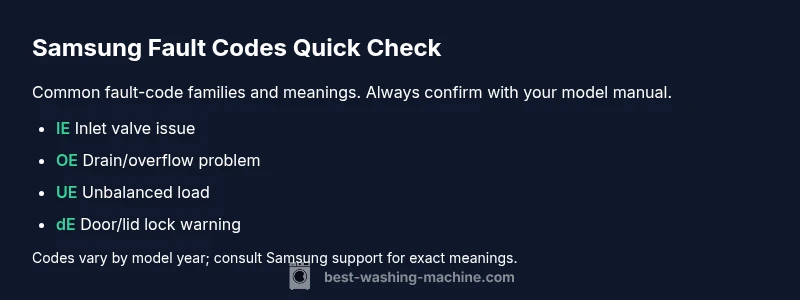
Samsung codes typically come in two-letter or short alphanumeric forms. While the exact meaning can vary by model, you’ll often see groups that signal the same subsystems: inlet and water supply issues, drainage or pump problems, motor or sensor faults, and door or lid lock warnings. Because codes differ by generation, always locate the code on the control panel and cross-check with your model’s user manual or the official Samsung support site. For rapid triage, map the code’s prefix to a subsystem (for example, inlet-related codes vs. drain-related codes). Keep a handy reference: write down the code, model number, and the cycle you were running when the code appeared. This practice makes it easier to search or request service without misidentifying the issue. Remember that some codes appear only during certain cycles, so timing matters. In the article you’re reading, we break down the most frequently encountered code families and what they generally imply, with model-agnostic guidance you can start using today.
Quick Home Fixes to Try Before Calling a Technician
For most codes, you can perform safe, non-destructive checks first. Always unplug the machine before touching anything, and never bypass safety interlocks. Start with basic steps: verify the power outlet works (try another device), inspect the door or lid lock for obstruction, and check hoses for kinks or leaks. Confirm water supply is on and the inlet hose isn’t clogged. Then, clear the drain filter or lint trap if accessible, and run a short wash test to see if the code reappears. If the code relates to balancing or load distribution, pause a cycle and rearrange the laundry evenly. Some codes require a user reset—turn off the machine, unplug for 60 seconds, then plug back in and restart. If the code persists after these at-home checks, you’ll want to consult the diagnostic flow below or contact Best Washing Machine for model-specific steps.
How Codes Vary by Model and Year
Samsung updates firmware and hardware across generations, so the same two-letter code can have slightly different interpretations in newer or older models. In practice, that means you should always reference your exact model number (found on the label inside the door frame or back panel) when looking up codes. Our guidance is to cross-verify with the official Samsung support pages and your user manual. If you’re replacing parts or performing advanced troubleshooting, verify compatibility with your model family. Even when codes appear identical across machines, the underlying cause may differ (e.g., two models may throw the same code for different sensor failures). This is why model-specific checks save you time and money. By understanding the firmware version and hardware configuration, you can avoid misdiagnosis. Best Washing Machine’s approach is to emphasize model-aware interpretation and safe, incremental testing before replacing parts.
Diagnostic Flow: From Symptom to Solutions
When a fault code appears, start from the symptom and work toward a root cause. In most cases, you’ll encounter one of three broad fault families: water inlet/inlet valve, drainage/ pump, or balance/door. Gather the following: the exact code, model number, and cycle during which the code occurred. Then check the obvious culprits: water supply, inlet hose kinks, clogged filters, a jammed drain pump, or an unbalanced load. If the code recurs, log the symptoms and sequence to share with a technician. In practice, you’ll map codes to a probable cause, try a safe fix, and re-run a test cycle. If the code persists after the fix, escalate to professional service. Best Washing Machine recommends documenting the code and model so technicians can prepare precisely for your machine.
Safety and When to Call a Professional
Always prioritize safety. Unplug the unit before performing any checks inside access panels, and do not manipulate live electrical components. If you smell burning, notice exposed wiring, or the issue involves the main power supply, stop immediately and call a licensed technician. For many codes, a quick home fix is feasible, but some faults require calibrated testing or replacement parts that only a pro should perform. Expect ballpark repair costs to vary by region and the exact fault; typical ranges often include parts and labor, but don’t treat these as quotes. Best Washing Machine’s guidance is to treat safety first and factor in potential costs for a pro, especially if the unit is under warranty or you’re unsure about diagnosis.
What to Expect from a Pro Repair and Cost Ranges
When you hire a technician, expect a diagnostic visit to confirm the fault code, assess the surrounding components, and estimate replacement parts. In many cases, common repairs such as replacing inlet valves, drain pumps, or door locks fall in a mid-range price band, while motherboard or control-board faults can push costs higher. A pro will typically provide a written estimate with a range for parts and labor, and you should compare at least two quotes for large repairs. For budgeting purposes, plan for ranges like $100–$300 for simple part replacements, $300–$600 for more extensive fixes, and higher if a control board needs replacement. Best Washing Machine notes that costs vary with model and region, but front-load Samsung models often lean toward the middle of these ranges when minor components are involved.
Prevention and Regular Maintenance to Minimize Codes
Regular maintenance reduces the frequency of fault codes and extends the life of your machine. Clean the lint filter, check hoses for wear, and keep the drain pump area free from debris. Run routine testing cycles to catch issues before a full fault occurs. Use high-quality detergent and avoid overloading the drum, which helps minimize balance codes. If you have a smart or connected model, ensure firmware updates are applied to keep codes accurate and actionable. By adopting a proactive maintenance mindset, you can reduce downtime and protect your investment; Best Washing Machine recommends scheduling periodic checks as part of household appliance care.
Reading Your Manual and Model-Specific Codes
Always refer to the exact manual for your Samsung model, especially when codes appear to be the same as those on other models. Manufacturers frequently update wiring diagrams, sensor placements, and code literals between generations, so model-specific guidance is essential. Start by locating your model number on the label inside the door jamb, back panel, or user interface, then search the official Samsung support site for your model’s fault codes and recommended fixes. If the manual isn’t available, call customer service or consult reputable repair guides that note generation and firmware version. This approach minimizes misdiagnosis and ensures you follow steps appropriate for your precise machine.
Steps
Estimated time: 30-60 minutes
- 1
Identify the code and model
Note the exact fault code from the display and locate your washing machine’s model number. Cross-check the code with the manual or Samsung support site to confirm the subsystem involved.
Tip: Take a photo of the code and model label for quick reference. - 2
Check power and door safety
Unplug the machine, inspect the door lock area, and ensure no obstructions keep the door from sealing. Plug back in and retry a brief cycle.
Tip: If the door shows a lock symbol, avoid attempting to force it. - 3
Inspect water inlet and hoses
Verify the water supply is on, hoses are not kinked, and the inlet screen is clean. Replace any clogged filters.
Tip: Do not use force to detach hoses; use gentle twisting to avoid leaks. - 4
Examine drain and filter
Locate the drain pump area or lint filter; remove debris and rinse. Run a short drain test if available in diagnostics.
Tip: A blocked filter is a common cause of OE-style codes. - 5
Reset and test
Power the unit off for 60 seconds, then power on and run a 15-minute test cycle to see if the code reappears.
Tip: Some models require a specific reset sequence in the manual. - 6
Decide on next steps
If the code persists, document symptoms and model details and contact a professional. Prepare part estimates and service options.
Tip: Keep your receipt and warranty information handy.
Diagnosis: Washing machine displays a fault code and stops mid-cycle
Possible Causes
- highInlet valve or water supply issue
- mediumDrain pump or filter blockage
- lowControl board or sensor fault
Fixes
- easyInspect water inlet valve and hoses; ensure water supply is open and unobstructed
- easyClear drain pump area and clean the filter
- hardReplace control board or sensor as recommended by a technician
FAQ
What does a two-letter fault code on a Samsung washer mean?
Two-letter codes usually indicate a subsystem fault (inlet, drain, motor, or door). The exact meaning depends on the model, so always verify with your model’s manual or Samsung Support. If the code recurs after safe fixes, plan a professional inspection.
Two-letter codes point to a subsystem issue; check the manual for model-specific meanings and consider a professional if the problem repeats.
Can I fix Samsung fault codes myself?
Many codes respond to quick checks like hoses, water supply, filters, and door locks. Always unplug first and avoid opening live electrical areas. If the code persists after safe fixes, escalate to a professional or use the diagnostic flow in this guide.
You can try basic checks, but stop and call a pro if the code persists.
Do fault codes vary between Samsung models?
Yes. Codes can vary by model and firmware version. Always match the code to your exact model and year, using the manual or official Samsung support pages for precise causes and fixes.
Codes vary by model, so always verify with the exact model and year.
What is the typical cost range for Samsung fault-code repairs?
Costs vary by fault. Typical ranges for common component replacements are roughly $100–$300 for parts and labor, $300–$600 for more complex repairs, and higher if a control board needs replacement. These are broad estimates and depend on region and model.
Repairs can range from about a hundred to several hundred dollars depending on the fault and parts.
Should I reset the washer to clear codes?
Some codes clear with a simple reset—power off, unplug for about a minute, then power back on. If the code remains after resetting, proceed with the diagnostic steps or call a technician.
A reset can clear some codes; if not, move to more in-depth checks or professional help.
When is it unsafe to diagnose a fault code myself?
If you smell burning, hear buzzing, see damaged wiring, or the issue involves the electrical supply, stop and call a licensed technician. Safety should always come first.
If you notice burning smells or damaged wiring, stop and get professional help.
Watch Video
The Essentials
- Identify and verify the exact fault code before acting
- Start with safe, at-home fixes (power, hoses, filters)
- Model-specific codes require model-number matching
- Capture codes and symptoms for accurate repairs
- Call a pro for persistent or high-cost repairs