Samsung Washing Machine Filter Location: Find It Fast
Learn exactly where Samsung washing machine filters live, how to remove and clean them, and essential maintenance for front-load and top-load models. Safe, step-by-step guidance to prevent clogs, leaks, and downtime.


Definition: On most Samsung washing machines, the filter is located behind a small access panel on the lower front, under the toe-kick. Front-load models typically hide the filter behind a removable grill, while some top-load models use a rear access door or a bottom panel. Always unplug before opening panels and handle the filter carefully.
Understanding Samsung filter systems
Samsung washing machines use one or more filters to trap lint, coins, buttons, and other debris before water reaches the pump. The exact configuration varies by model, but most modern front-load and many top-load designs share a similar goal: prevent clogs and extend pump life. Before you start, note that filter housing locations differ across series, so having your user manual handy helps. In general, you’ll encounter two main access points: a toe-kick panel at the bottom front (common on front-load models) or a service door behind the lower front panel; some top-load machines place the filter behind a rear access hatch. Always unplug the unit before opening any panels and never force a stubborn cap. With the right approach, locating the filter becomes a routine maintenance task rather than a mystery.
Where the filter is commonly located on front-load models
On most Samsung front-load washers, the filter is accessed through the toe-kick area at the bottom front of the machine. You’ll typically see a small grille or removable strip that can be pulled out without tools. Behind this grille is the filter housing, which may have a round cap or a square grate. Some models require you to slide out a small plastic tray to reach the filter. To avoid spills, place a towel on the floor and gently loosen the cap counterclockwise; keep a bucket handy if your model uses a removable cartridge. Always confirm with your model’s manual, since placement can vary by year and series.
Where the filter is commonly located on top-load models
Top-load Samsung models vary more. A substantial number place the filter behind a service door at the back or behind a bottom front panel that you access from the outside. For many, you’ll need to lift a small access cover on the front panel or pull away the bottom kick panel. The filter itself may be a basket-style piece or a rounded cartridge that twists free. In all cases, expect a small amount of water to spill when you remove the filter; have towels ready and unplug first. If your model has a rear-access design, you may need to reach from the back panel.
How to identify model-specific access points
To precisely locate the filter on your Samsung model, check the user manual’s maintenance or service section. If you don’t have a manual, search the model number on Samsung’s support site; many model pages include a diagram of the filter housing. Look for keywords like 'lint filter', 'pump filter', or 'drain filter'. If your model uses a rear access panel, you may see a small removable plate on the back panel. Having a photo of the panel helps you avoid unnecessary disassembly and reduces the risk of misplacing parts.
How to remove, clean, and reassemble the filter safely
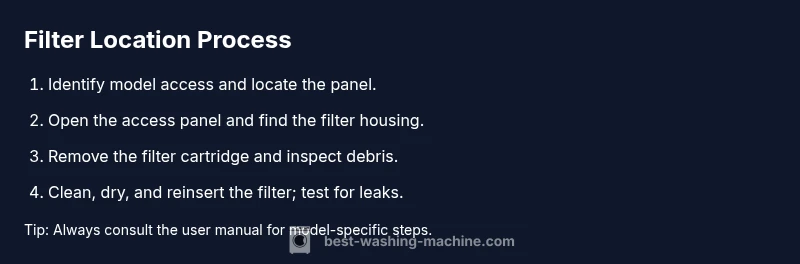
Once you locate the filter, prepare a shallow tray or towels to catch residual water. Loosen and remove the filter cartridge or grate, taking care not to drop debris into the pump housing. Rinse the filter under running water, using a soft brush to dislodge lint and hair. Inspect the housing for cracks or heavy buildup; if you see damage, replace the filter assembly. Dry the components before reinstalling, then re-seat the filter firmly and replace the access panel. Run a short test cycle with a load to ensure there are no leaks.
Maintenance schedule and when to replace the filter
Regular maintenance reduces the risk of clogs, leaks, and pump damage. Check the filter monthly if you run frequent loads or notice slower drainage. Clean the filter if you see lint, coins, or fabric fibers, and replace it if the plastic housing shows cracks or wear. Some Samsung models use a reusable cartridge, while others require a whole filter assembly. Keeping a simple maintenance log helps you stay on top of replacements and keeps your washer performing at its best.
Common mistakes to avoid
Avoid overtightening filter caps, which can crack housings or damage threads. Don’t ignore leaks around the panel; a loose seal can mask a bigger problem. Do not operate the washer with the filter removed or panels open, as this creates safety risks and can splash water into electrical components. Finally, avoid using harsh chemicals inside the filter housing; stick to mild detergent and water for cleaning.
Tools & Materials
- Flashlight(Shine light into the filter housing to spot debris)
- Towel or shallow tray(Catch water and keep the area clean)
- Gloves(Optional protection for your hands)
- Screwdriver (Phillips or flathead)(To release stubborn panels)
- Owner's manual or model diagram(Model-specific filter location)
Steps
Estimated time: 15-25 minutes
- 1
Unplug and prep
Unplug the washer and move it slightly away from the wall. Gather towels and the tools you’ll use so spills don’t catch you off guard.
Tip: Unplugging first prevents electrical hazards; have the manual handy for reference. - 2
Access the panel
Identify whether your model uses a toe-kick panel or a service door and carefully open it.
Tip: If clips resist, use minimal force and avoid prying; damage can create new leaks. - 3
Locate the filter housing
Look for a round cap, square grate, or removable cartridge behind the opened panel.
Tip: Some units require you to rotate a cap counterclockwise to release it. - 4
Remove the filter
Gently pull the filter cartridge or grate out, letting any debris fall into the tray.
Tip: Keep debris contained; you don’t want shards entering the pump. - 5
Clean and inspect
Rinse the filter under cool water, scrub lightly, and check the housing for cracks or buildup.
Tip: Use a soft brush and avoid harsh chemicals that could damage seals. - 6
Reinstall and test
Dry parts, reseat the filter, reclose the panel, and run a short cycle to verify no leaks.
Tip: Ensure a firm seal and proper alignment to prevent future leaks.
FAQ
Where is the filter located on Samsung front-loading washers?
On most front-load Samsung models, the filter is behind a toe-kick or bottom-front access panel. Open the panel and locate the filter housing to remove the cartridge for cleaning.
On most front-load Samsung washers, you’ll find the filter behind the bottom-front access panel. Open it, locate the housing, and remove the cartridge for cleaning.
Do all Samsung top-load washers have a filter?
Many top-load Samsung models use a bottom or rear access panel for the filter; some older models may not have a user-serviceable filter.
Most top-load Samsung washers have a bottom or rear access panel for the filter, though a few older models may not have a user-serviceable filter.
How often should I clean or replace the filter?
Check the filter monthly if you run many loads; clean when you notice slower drainage or odd noises. Replace if damaged.
Check the filter monthly, clean it if you notice clogging, and replace if damaged.
What safety steps should I follow before removing the filter?
Unplug the washer, turn off the water supply, and have towels ready. Use gloves if needed and avoid forcing the filter.
First unplug the machine and turn off the water, then handle the filter carefully.
What if water leaks after removing the filter?
Wipe up spills, check door seals, and ensure the filter is fully reseated. If leaks persist, contact a technician.
If water leaks, wipe up the spill, check seals, and reseat the filter; if it keeps leaking, contact support.
Is filter maintenance covered under warranty?
Filter cleaning is generally considered normal maintenance and should not void warranty, but check your terms.
Regular maintenance like filter cleaning is usually allowed under warranty; check your terms.
Watch Video
The Essentials
- Know your model’s access point before starting
- Clean and inspect the filter during every maintenance
- Re-seat parts securely to prevent leaks
- Establish a simple monthly maintenance routine