Samsung Washing Machine Won't Drain: Troubleshooting
Comprehensive troubleshooting for a Samsung washing machine that won't drain, with safe checks, common causes, and when to call a professional.


Common drain issues on a Samsung washing machine are usually a clogged pump filter or blocked drain hose. Start with the easy checks: unplug the unit, clean the pump filter, inspect the drain hose for kinks, and run a short drain test. If water still won’t drain, the pump or lid switch may be faulty. Best Washing Machine recommends starting here.
Why your Samsung washing machine won't drain
When a Samsung washing machine won't drain, the most common culprits are clogs and worn components rather than a mysterious electrical fault. A clogged pump filter or blocked drain hose is the usual suspect, especially after many loads of towels or pet hair. Debris can accumulate in the filter basket and reduce or stop water flow. A faulty drain pump or a failed lid switch on some top-load models can also prevent draining and trigger error codes. The Best Washing Machine team has found that starting with quick, non-destructive checks often resolves the issue without calling a technician. Before you begin, unplug the machine to avoid shocks, and if you need to reach behind the unit, gently move it away from the wall to access hoses and the pump. Look for standing water in the drum or pump area as a sign something is wrong and note any unusual noises when the drain cycle runs. Environmental factors such as a blocked standpipe or a clogged sewer line upstream can also mimic a drain failure. Keep an eye out for strange odors that indicate a blocked path.
Quick checks you can perform safely
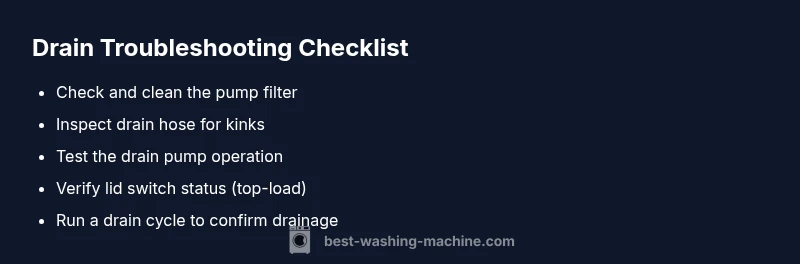
Before taking anything apart, perform these quick checks to rule out the simplest causes. Unplug the washer to avoid any risk of shock. Inspect the drain hose for kinks, twists, or crushing by furniture; straighten and raise the hose if it sags. Locate and remove the pump filter (usually accessible behind the lower front panel); clear lint, hair, coins, and fabric fibers. Rinse the filter and reinstall it securely. Check the drain pump housing for debris after removing the filter; if you see debris, clear it with long-nosed pliers. For top-load models, verify the lid switch engages properly by pressing the lid area while the cycle is running. If there’s standing water in the drum, try a short drain/spin cycle to observe water movement and listen for the pump motor. If any of these steps reveal a leak or damaged component, stop and call a pro.
Common culprits: pump, filter, hose, and lid switch
- Pump failure: If the pump motor is buzzing without moving water or makes grinding sounds, the impeller may be worn or the motor winding damaged. A failed pump typically requires replacement.
- Filter clog: A clogged pump filter restricts water flow; cleaning usually restores drainage.
- Drain hose blockage or kink: A blocked hose traps water inside; clear blockages using a flexible rod or hose brush.
- Lid switch (top-load): If the lid switch won’t detect the lid is closed, the washer may halt draining to prevent spin.
Understanding these common culprits helps you prioritize which part to inspect first.
How to access and clean the pump filter
Step-by-step access is model-dependent, but most Samsung front-load washers share a similar design. Lay a towel to catch residual water. Remove the lower front access panel or toe-kick. Locate the pump filter (a black plastic cap), turn it counterclockwise, and pull it out. Have a bucket ready for dirty water. Remove lint and debris with fingers or pliers, rinse the filter under running water, and reinsert it firmly until it locks. Reassemble the panel and run a test cycle to confirm drainage. If the filter is clean but drainage remains poor, the issue may be the impeller or the pump motor itself.
Diagnostic flow: symptom → diagnosis → solutions
If water remains in the drum after a wash cycle, follow a simple diagnostic path. Symptom: standing water after drain; Diagnosis: clogged filter or hose; Solution: clean and clear. Symptom: pump hum but no water flow; Diagnosis: pump failure or electrical fault; Solution: test pump power and replace if required. Symptom: error code indicating drain; Diagnosis: lid switch or sensor issue; Solution: inspect switch and wiring. When in doubt, consult the manual’s diagnostic flow chart or contact Best Washing Machine for guidance.
Step-by-step repair guide (most common fixes)
- Power off and unplug the washer Description: Disconnect power, move the unit, and protect yourself from shocks. Tip: never work on live electrical components.
- Access the drain pump filter Description: Remove panel, prepare towels, locate the filter cap, twist to loosen. Tip: keep a container nearby for dirty water.
- Clean the filter and inspect the pump Description: Remove debris, rinse, reinstall, and listen for pump operation. Tip: check impeller for damage.
- Inspect drain hose and standpipe Description: Detach hose, straighten, and check fittings; clear blockages at the end. Tip: ensure hose end is above water line when testing.
- Run a test cycle Description: Reconnect power, select drain/spin, observe water flow; listen for the pump. Tip: capture any error codes.
- Decide on replacement if needed Description: If the pump fails to run or makes unusual sounds, plan replacement. Tip: order OEM parts to ensure compatibility.
Safety reminders and professional help
Safety first: always unplug before inspections. Water plus electricity is dangerous; avoid using the washer if you notice leaks or a burning smell. If you find damaged wiring, burnt components, or if the symptom persists after the checks above, it’s time to call a licensed technician. Attempting major electrical work or pump replacement without proper tools can cause further damage or injury. Best Washing Machine recommends consulting official service channels or authorized repair partners for reliable diagnosis and parts.
Prevention and maintenance tips to avoid future drainage issues
- Clean the pump filter monthly or after heavy use; debris like hair and lint is the main accumulation point.
- Keep drain hoses clear of kinks and ensure the hose end is properly elevated if required.
- Use the appropriate amount and type of detergent; excess suds can trap debris.
- Periodically run a maintenance cycle to keep the drainage path clear.
- Record any recurring drainage warnings and address them promptly to prevent bigger problems later.
Steps
Estimated time: 45-60 minutes
- 1
Power off and unplug
Physically disconnect the washer from power and move it away from the wall to access hoses safely. This prevents shocks while inspecting the drain components.
Tip: Use a flashlight to spot loose wires or damaged harnesses before touching anything. - 2
Open access and locate the filter
Remove the toe-kick panel or lower front panel to expose the drain pump area. Find the filter cap and prepare a container for water.
Tip: Have towels ready; water will spill when you loosen the filter. - 3
Clean the filter
Turn the filter counterclockwise to remove it, clear debris, rinse under running water, and reinsert firmly until it locks.
Tip: Inspect the impeller area for any visible damage. - 4
Check the drain hose
Disconnect the hose and straighten it; check for kinks or restrictions, and confirm the end isn’t blocked by a standpipe or drain trap.
Tip: Do not force the hose; carefully remove any obstruction with a flexible brush. - 5
Run a test cycle
Reconnect power, select a drain/spin cycle, and observe water movement and pump operation. Listen for the pump motor and look for leaks.
Tip: Note any error codes shown on the display. - 6
Decide on replacement if needed
If the pump doesn’t operate or makes grinding noises, plan for a pump replacement using compatible parts.
Tip: Avoid cheap aftermarket parts; choose OEM or manufacturer-approved options.
Diagnosis: Water won't drain after a wash cycle
Possible Causes
- highClogged pump filter
- highBlocked drain hose
- mediumFaulty drain pump
- lowLid switch failure (top-load)
Fixes
- easyUnplug, then clean the pump filter and inspect the pump area for debris
- easyInspect and clear the drain hose and standpipe
- hardReplace the drain pump assembly if it doesn’t run or makes grinding noises
- mediumTest and replace lid switch or wiring if needed
FAQ
Why won't my Samsung washer drain after the cycle?
Most drain failures come from a clogged pump filter, a blocked drain hose, or a faulty pump. Start with the filter, then hose, and test the pump. If unresolved, consider professional service.
Most drain failures come from a clogged pump filter, blocked hose, or faulty pump. Start with the filter, then the hose, and test the pump. If unresolved, contact a professional.
How do I clean the drain pump filter on a Samsung washer?
Locate the filter, usually behind the toe-kick. Remove the cap, clear debris, rinse, and reinstall. Re-run a drain cycle to confirm drainage.
Find the filter behind the toe-kick, remove the cap, clean, rinse, and reinstall. Run a test drain afterward.
Can a bent drain hose cause not draining?
Yes. A kinked or blocked drain hose can trap water and stop drainage. Straighten the hose and remove any blockages at the end.
A kinked drain hose can trap water and stop drainage; straighten it and clear the end.
Is the lid switch a common cause for not draining?
On top-load models, a faulty lid switch can prevent draining. Test the switch and wiring, and replace if faulty.
A faulty lid switch can stop drainage on top-load washers. Test and replace if needed.
Should I keep using the washer if it won't drain?
Avoid using the washer until drainage is resolved; water exposure can cause additional damage and safety risks.
Don’t run it until drainage is fixed to avoid further damage or safety risks.
When should I call a professional?
If you suspect electrical issues, if the pump needs replacement, or if codes persist after checks, a licensed technician is recommended.
Call a professional if electrical issues are suspected or the problem persists after checks.
Watch Video
The Essentials
- Start drainage fixes with pump filter and hose checks.
- Clean filters regularly to prevent recurring clogs.
- Test pump operation and lid switch before replacing parts.
- Consult a professional if electrical components or major replacements are needed.