What If Washing Machine Shows IE (Inlet Error)?
Discover what IE means when your washing machine shows IE, plus quick fixes, a diagnostic flow, step-by-step repairs, safety tips, and cost ranges to get your laundry day back on track in 2026.


IE on most washers signals an inlet error—most often a water-supply issue that keeps the machine from filling. Start with basic checks: confirm faucets are on, inspect hoses for kinks or leaks, and clean the inlet screens. If the error remains after those steps, a faulty inlet valve or pressure sensor may be the culprit and requires professional service.
What IE Means in a Washer: Quick Definition and Why It Matters
When a washing machine displays IE, it usually points to the water inlet subsystem rather than a mechanical motor fault. The initials stand for an inlet error, and it commonly stops the machine before it begins filling so that no cycle can proceed. For homeowners, this is urgent because without proper filling, clothes cannot be washed, rinsed, or spun. You may notice the error after selecting a cycle and pressing start, or the machine may fail to advance to the wash phase altogether. In many brands, IE is tied to the water inlet valve, the supply hoses, the screens or filters at the valve, or the pressure switch that confirms the tub is tolerably full. Understanding this helps you prioritize the right fixes and avoid unnecessary parts replacement.
To help you act quickly, keep in mind that IE can stem from a simple clog in the inlet filter or a valve that’s only partially open, or more rarely from a faulty sensor or control board. This guide uses practical, brand-agnostic steps you can perform safely as a homeowner, with clear indicators that point toward the most likely causes. Remember: many IE scenarios are solvable without a service call, especially if you catch them early and follow methodical checks.
What IE Means in a Washer: Quick Definition and Why It Matters
When a washing machine displays IE, it usually points to the water inlet subsystem rather than a mechanical motor fault. The initials stand for an inlet error, and it commonly stops the machine before it begins filling so that no cycle can proceed. For homeowners, this is urgent because without proper filling, clothes cannot be washed, rinsed, or spun. You may notice the error after selecting a cycle and pressing start, or the machine may fail to advance to the wash phase altogether. In many brands, IE is tied to the water inlet valve, the supply hoses, the screens or filters at the valve, or the pressure switch that confirms the tub is tolerably full. Understanding this helps you prioritize the right fixes and avoid unnecessary parts replacement.
To help you act quickly, keep in mind that IE can stem from a simple clog in the inlet filter or a valve that’s only partially open, or more rarely from a faulty sensor or control board. This guide uses practical, brand-agnostic steps you can perform safely as a homeowner, with clear indicators that point toward the most likely causes. Remember: many IE scenarios are solvable without a service call, especially if you catch them early and follow methodical checks.
Steps
Estimated time: 30-60 minutes
- 1
Power down and safety check
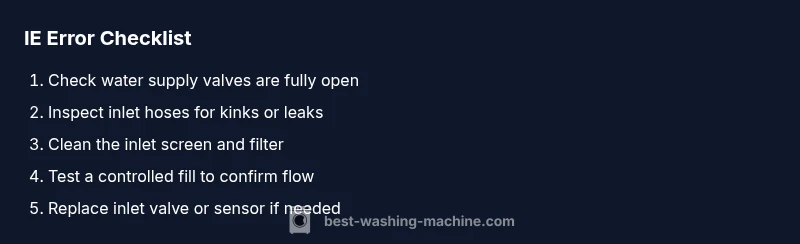
Unplug the machine and turn off the cold water supply at the wall valve. Clear the area around the machine so you can access hoses and the inlet valve safely. This first step protects you from shocks and leaks while you inspect connections.
Tip: Always unplug before touching any internal components. - 2
Verify water supply
Ensure both hot and cold supply valves are fully open and there is consistent water pressure. If you have a shared valve or a flow-restricting screen, address that first; a weak water flow is a common cause of IE.
Tip: Run a quick faucet to confirm water makes it to the machine’s inlet hose. - 3
Inspect inlet hose and connections
Place a towel under the hoses, disconnect the inlet hoses from the machine, and check for kinks, crushing, or leaks. Reconnect securely and avoid overtightening. Any visible damage should be replaced.
Tip: If you notice a loose fitting, re-tighten by hand and test again. - 4
Clean the inlet filter/screens
With the hoses detached, locate and remove the filter at the machine’s valve. Rinse it under running water to clear sediment or mineral buildup. Use a soft brush to dislodge stubborn debris, then reassemble.
Tip: Do not run the machine without a filter; it protects the valve from debris. - 5
Test a controlled fill
Reconnect hoses, plug in the unit, set a short cycle, and start a test fill. Observe the inlet valve operation and listen for the sound of water entering the tub. If water still won’t flow, you may need to test the valve circuitry.
Tip: If you hear unusual buzzing or no click from the valve, the valve or control circuit may be faulty. - 6
Assess next steps
If the test fill succeeds, you’re likely dealing with an intermittent sensor or a connection issue. If it fails, consider replacing the inlet valve or pressure sensor. For many machines, a professional diagnostic is recommended if you’re unable to confirm a simple fix.
Tip: Keep your receipts and model number handy for parts compatibility.
Diagnosis: Washing machine shows IE and will not fill with water
Possible Causes
- highWater supply valve closed or restricted
- highClogged or dirty inlet filter/screen
- mediumKinked or blocked inlet hose
- mediumDefective inlet valve or pressure sensor
- lowControl board fault or miscommunication
Fixes
- easyOpen valves and remove any obstruction; run a test fill
- easyClean the inlet filter and screens
- easyInspect hoses for kinks and replace if damaged
- mediumReplace inlet valve or pressure sensor if electrical test fails
- hardReset control board or arrange professional diagnostic
FAQ
What does IE mean on a washing machine?
IE indicates an inlet error, usually related to water supply, hoses, or the inlet valve. It prevents filling, stopping the cycle. Start with basic checks before pursuing expensive parts.
IE means an inlet error related to water supply; begin with simple checks before deeper repairs.
Can unplugging the machine clear IE?
unplugging can reset some transient faults, but IE is typically caused by water supply or sensor issues. If the problem recurs after a reset, investigate valves or filters.
Unplugging may reset minor glitches, but IE usually points to a plumbing or sensor problem.
How much does it cost to fix IE?
Costs vary by cause. A simple filter cleaning or hose replacement might be under $50–$150, while valve or sensor replacements can range $100–$300 plus labor if you hire a pro.
Costs depend on the fix; simple parts are cheaper, while valve or sensor work costs more and may require a pro.
If hoses are okay, what else should I check?
Check the water inlet valve for moisture or buzzing, inspect the pressure switch, and verify the control board signals. Intermittent failures may require professional testing.
If hoses are fine, look at the valve and pressure switch, and consider a professional diagnostic if needed.
Is IE the same across brands?
The core idea is consistent—an inlet problem—but labeling and exact components differ by brand. Always refer to your model's manual for precise diagnostics.
IE is generally an inlet-related error across brands, but specifics vary by model.
Watch Video
The Essentials
- Identify IE as an inlet-related issue.
- Prioritize water supply, hoses, and filters first.
- Follow the step-by-step fix before considering complex repairs.
- Call a professional for sensor/valve or control-board faults.