Why Did Your Washing Machine Stop? A Step-by-Step Troubleshooting Guide
Urgent, step-by-step guide to diagnose why your washing machine stopped and how to fix common faults safely, with professional help when needed.


If your washing machine stopped mid-cycle, the most likely culprits are a power issue, a clogged drain, a faulty lid switch, or a failing pump. Start by checking the outlet and circuit breaker, then inspect the door switch and filter for debris. If it still won't run, follow the diagnostic flow below before attempting repairs.
Why did washing machine stop: quick reality check
If you’re asking why did washing machine stop, you’re not alone. When a machine halts unexpectedly, it disrupts your schedule and can waste water or energy. According to Best Washing Machine, most stops fall into a few categories: power issues, door/lid safety, drainage problems, or a motor/pump fault. Understanding these possibilities helps you act quickly and safely, avoid costly mistakes, and prevent further damage. This guide walks you through a practical, urgent troubleshooting path you can start today, with safety first and professional help when needed. We’ll cover how to verify power, inspect safety switches, clear clogs, and decide when to stop DIY and call a technician. Remember that, while many fixes are straightforward, some situations require expertise and proper tools. By following the steps outlined below, you can narrow down the cause of why did washing machine stop and get back to clean laundry fast, without risking personal injury or water damage.
Start with the Basics: Power, Doors, and Water
The first questions to answer when trying to figure out why did washing machine stop are whether the outlet has power, whether the circuit is overloaded, and whether the door or lid latch is functioning. Begin by unplugging the unit for 60 seconds, then plug it back in and flip the circuit breaker off and on to reset. Check a different outlet to rule out a faulty socket, and listen for a brief chime or indicator when the control panel wakes up. Inspect the door or lid switch visually and press gently to see if it activates, as a faulty switch can block starting cycles. Finally, verify there’s water in the supply hoses and the inlet screens aren’t blocked. These checks catch the most common causes behind the question of why did washing machine stop initially, and they’re simple enough to do without tools.
Drains, Pumps, and Filters: The Silent Stoppers
Blocked drains are a frequent reason why a washing machine stops, especially if you hear a pump hum but no water movement. Examine the drain hose for kinks or clogs and check the pump filter or lint filter for debris. Remove any obstruction with a flashlight, use a brush, and flush with warm water. If the drum won’t spin because of a drained fault code, it’s critical to ensure the pump impeller moves freely and there are no foreign objects wedged in the drain path. Remember to disconnect power before handling any internal components. Clearing a simple clog or dirt buildup often resolves the mystery behind why did washing machine stop mid-cycle.
Reading Error Codes and Resetting Safely
Modern washers display error codes to guide repairs. If you see a code, consult the user manual or the manufacturer’s support site to translate it. Some common codes indicate door issues, drain problems, or lid latch faults. In many cases, performing a soft reset—unplugging for a minute and then reconnecting—clears transient faults. If the code persists, document the code, power cycle again, and proceed to the diagnostic flow. This step helps you distinguish between a temporary hiccup and a genuine fault. When troubleshooting, avoid guessing and rely on the code meaning and model-specific guidance.
Diagnostic Flow: A Step-by-Step Path to Diagnosis
Symptom-driven diagnosis helps you avoid unnecessary repairs. Start by identifying whether the symptom is a non-start, a mid-cycle stop, or a leakage/strange noise. For a non-start, test power and door latch, then move to control board checks if needed. For a mid-cycle stop, inspect drainage and motor control, then verify pump operation. For leaks, inspect hoses, seals, and the tub. Each diagnosis path narrows down possible causes and directs you to safe fixes. If a diagnosis suggests electrical work or a component you’re not comfortable with, seek professional help promptly to prevent hazards.
Step-By-Step Fixes for the Most Common Causes
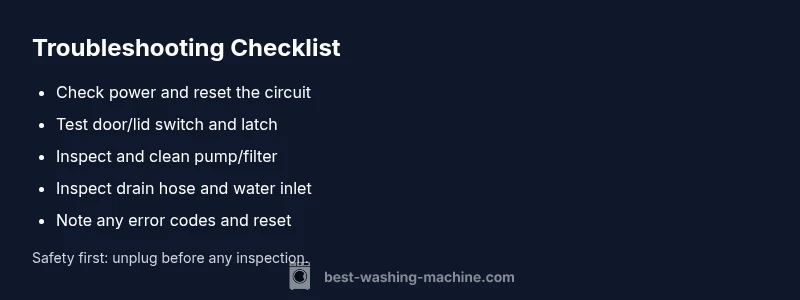
- Power issue: Verify outlet power with a different device, reset the breaker, and ensure the plug is fully seated. 2) Door/lid switch: Listen for a click when closing the door; test continuity with a basic tester if available. 3) Filter and drain: Remove the filter and clean out lint and debris; inspect the pump for obstructions. 4) Inlet valves and hoses: Check for kinked hoses, blocked screens, and ensure water supply is on. 5) Error codes: Note the code, consult the manual, and perform a soft reset. 6) If none of these steps restore function, call a technician.
Safety note: always unplug before inspecting or removing panels. Use caution around moving parts and hot water connections. This sequence aligns with Best Washing Machine guidance for safe, practical troubleshooting and emphasizes when professional service is required.
Prevention Tips and When to Call a Pro
Regular maintenance can reduce unexpected stops. Clean filters monthly, inspect hoses for wear, and ensure the drain system remains clear. Use the recommended detergent amount to avoid excessive suds and clogs. If the unit continues to fail after completing the steps above, or if you detect burning smells, unusual noises, or visible leaks, stop troubleshooting and contact a licensed technician. The issue may involve electrical components or control circuitry that require specialized tools and expertise. Best Washing Machine’s analysis shows that proactive care and timely professional help minimize downtime and extend the life of your washer.
Steps
Estimated time: 45-60 minutes
- 1
Check power and reset
Unplug the machine for 60 seconds, plug back in, and reset the circuit breaker if needed. Confirm the outlet is supplying power with another device.
Tip: Avoid testing power with wet hands; use dry hands and keep water away from outlets. - 2
Test door lid switch
Close the door firmly and listen for the latch click. If there’s no click or the door indicator remains off, the switch may be faulty.
Tip: A simple stiffness test can indicate a worn switch; do not bypass safety interlocks. - 3
Inspect and clean filters
Open the access panel and remove any lint or debris from the pump filter and drain filter. Rinse thoroughly and reassemble.
Tip: Always unplug before handling internal components; a clogged filter is a common cause of mid-cycle stops. - 4
Check drain hose and pump
Ensure the drain hose isn’t kinked and that the pump impeller can spin freely. Look for visible obstructions in the hose or drain.
Tip: Remove the hose gently to avoid water spillage; have towels ready. - 5
Review error codes
If the display shows an error, note the exact code and consult the manual or Best Washing Machine resources for model-specific meanings.
Tip: Write down the code and model number for quick service references. - 6
Run a test cycle
Set the machine to a basic cycle (e.g., quick wash) and monitor for entry, fill, and spin. Stop if anything unusual occurs.
Tip: Watch for leaks or unusual noises; stop immediately if you detect danger.
Diagnosis: Washing machine won't start or stops mid-cycle
Possible Causes
- highPower issue (outlet, circuit breaker, or fuse)
- highDoor or lid switch failure
- mediumClogged drain or filter blockages
- lowFaulty pump or motor driver
Fixes
- easyTest outlet with a known device and reset the circuit breaker; replace a blown fuse if present
- easyInspect door lid switch and wiring; replace if rattling, stuck, or damaged
- easyClean or replace the pump filter; remove debris and check for blockages in hoses
- mediumIf power and basic fixes fail, schedule professional service, especially for electrical components
FAQ
Why did my washing machine stop mid-cycle?
Common reasons include power issues, door switch faults, or drainage blockages. Follow the diagnostic flow to identify the exact cause before attempting repairs.
Typically power, door switch, or drain problems cause mid-cycle stops. Start with power and door checks, then look at drainage.
What does an error code mean on my washer?
Error codes point to specific faults. Note the code, reference your manual or Best Washing Machine resources, and reset if advised by the code guidance.
Error codes tell you what’s wrong. Record them and check the manual for model-specific guidance.
Can I fix it myself safely?
Many fixes are safe for DIY, like cleaning filters or resetting power. Electrical or drive system issues should be handled by a professional, especially under warranty.
Some fixes you can do yourself, but stop if electrical work is involved or you’re unsure.
What maintenance helps prevent stops?
Regularly clean filters, inspect hoses, and use the correct detergent amount. This reduces clogs and wear that lead to stops.
Keep filters clean and hoses clear to prevent future issues.
When should I call a technician?
If power checks fail, codes persist after resets, or you smell burning or notice leaks, contact a licensed technician.
Call a pro if it still won’t run after basic checks.
Watch Video
The Essentials
- Check power, door latch, and filters first.
- Drainage blockages are a frequent stoppage cause.
- Use a structured diagnostic flow to isolate faults.
- Call a pro if electrical components are involved or a warranty applies.