How to Reset LG Washing Machine: Step-by-Step Guide
Learn how to reset LG washing machines with safe, model-specific steps. This guide covers soft resets, power cycles, and when to seek support, ensuring you can troubleshoot common errors effectively.


To reset an LG washing machine, start with a simple power cycle to clear minor glitches, then use model-specific button sequences to reset error codes if needed. Most common resets involve unplugging the unit for 1–5 minutes and reconnecting, followed by a brief test run. If the fault persists, consult the user manual or LG support for the exact keypad combination for your model.
Understanding reset scenarios for LG washing machines
If you're trying to fix a stuck cycle or an unexpected error, knowing when and how to reset can save you a service call. The phrase how to reset lg washing machine appears frequently in customer questions, and the answer depends on the fault type and your model. In general, resets work by clearing temporary glitches, restoring default electronics, and reinitializing sensors. Start with a soft power cycle: unplug the unit, wait a short pause, then reconnect and start a basic test run. If the error recurs, you may need a model-specific keypad sequence or a more thorough hard reset. Always check your manual or LG’s official support site for the exact steps tied to your model family (front-load vs top-load). With the right approach, many issues are resolved without a technician visit.
Soft reset vs hard reset: what to know
A soft reset clears transient errors without restoring factory settings, while a hard reset reinitializes internal memory and can reset configurations. In practice, a soft reset is often enough for minor glitches, such as a cycle that won’t start or a display that freezes. A hard reset is more involved and may require following a model-specific sequence. When in doubt, begin with the soft approach and only escalate to a deeper reset if the same fault returns after a short period.
Power cycle: simple, safe, repeatable steps
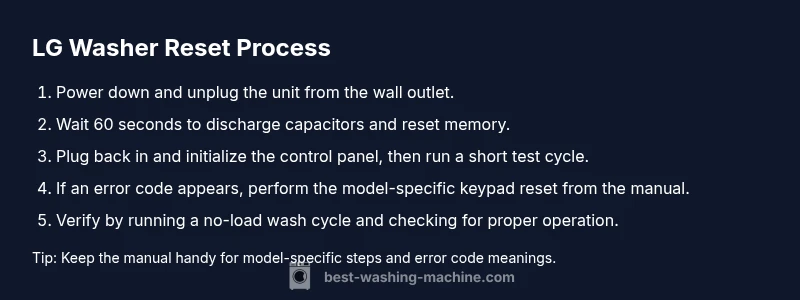
The most universally safe reset method is a power cycle. Steps include unplugging the washer from the wall outlet, waiting 60 seconds (or longer if you prefer), then plugging it back in and selecting a quick wash or test cycle. This method clears most electronic glitches and reinitializes sensors. If your model uses a lock or child safety feature, ensure you unlock it before attempting the test cycle. Do not use a surge protector or extension cord during resets, as a power surge or interruption can cause additional faults.
Model-specific reset sequences and when to use them
LG models differ in reset procedures. Front-load washers often require a specific button combo while top-load models may use a combination of Start, Pause, and Power buttons. Always refer to the owner’s manual or LG Support for your exact model family and firmware version. If you’ve lost your manual, LG’s official site or a verified support article will list the correct sequence. In most cases, you’ll want to perform a power cycle first, then attempt the keypad sequence if prompted by an error code.
Error codes and how a reset interacts with them
Resetting can clear many temporary error codes such as cycles that stall or misreads from sensors. However, codes indicating a malfunctioning component (pump, door lock, heater) may persist after a reset and require professional service. Keep a record of any error codes displayed, including the exact wording and blinking patterns. If a code repeats after reset, write it down and consult LG support with your model number and firmware version for precise troubleshooting.
Safety and preparation before resetting
Before any reset, unplug the unit from the wall and ensure the surrounding area is dry. Remove any clothes from the drum to avoid unbalanced loads or unintentional starting. If the washer is in a high-humidity space, wipe down moisture around the control panel to prevent shorts. Do not reset a washer that shows signs of a flood or water leakage; in those cases, shut off the water supply and contact a qualified technician.
When to reset vs call support: a quick decision guide
Use resets for occasional glitches and error codes that clear after a cycle. If problems persist after a soft reset, or if the fault reappears with the same code, escalate to a model-specific reset or contact LG support. If you hear unusual noises, smell burning, or notice water leaks, stop using the machine immediately and seek professional service. A reset is not a substitute for necessary repairs.
Verifying a reset: test protocol and checks
After completing a reset, run a short wash cycle with no load to verify all systems operate normally. Check that the drum spins smoothly, the door locks correctly, and there are no error messages on the display. Listen for unusual sounds, and confirm the water inlet and drainage hoses are properly connected. If the test cycle completes without errors, you’ve likely resolved the issue; if not, document the new codes and proceed with further troubleshooting.
Maintenance practices to reduce future resets
Regular maintenance reduces the frequency of resets. Clean the washing machine door seal, filter (if accessible), and detergent dispenser to prevent residue buildup. Check hoses for cracks or kinks and ensure the drum is level to avoid unbalanced loads. Schedule periodic software updates if your LG model supports them, and store the user manual in an easily accessible place for quick reference.
Quick-reference flowchart and printable tips
- Issue occurs during a cycle → try power cycle
- Error code appears → check manual for code meaning
- Codes persist after reset → attempt model-specific reset
- No codes but abnormal behavior → test a short cycle and inspect for leaks or noise
- Problems continue → contact LG support or a technician
This section provides a concise decision path you can print and keep near your laundry area for fast reference.
Tools & Materials
- LG washing machine manual (model-specific reset section)(Have the exact model number on hand to confirm the correct sequence.)
- Access to a wall outlet (no surge protector)(Unplug from a standard outlet; avoid power strips during resets.)
- Clean, dry cloth(Optional for wiping moisture from the control panel.)
- Pen and paper(Record any error codes or observations during the reset.)
Steps
Estimated time: 15-25 minutes
- 1
Power down and unplug
Turn off the machine using the power button if available, then unplug it from the wall outlet. Wait for 60 seconds to ensure capacitors discharge and to reset the control board’s memory.
Tip: If the unit is difficult to access, switch off the circuit breaker for a minute instead of unplugging. - 2
Inspect and prepare
Check that the drum is empty and the door is unlocked. Ensure the laundry area is dry and free of standing water before proceeding.
Tip: Remove any small objects that could jostle during the reset process. - 3
Reconnect power
Plug the washer back into the wall outlet and turn on the power. Do not press any cycle button yet; allow the control panel to initialize for about 15–30 seconds.
Tip: If the display remains blank, inspect the outlet and ensure the cord is fully seated. - 4
Run a basic cycle
Select a cold wash or quick cycle to verify basic operation. Do not load clothes for the first test to avoid tumbling issues if something is off balance.
Tip: Observe for abnormal vibrations or noises during the initial spin. - 5
Model-specific reset if needed
If an error code appears again, perform the model-specific keypad sequence as outlined in the manual or LG support article for your model family.
Tip: Have the exact model number and firmware version handy when contacting support. - 6
Evaluate results
If the cycle completes without errors, record the success. If a fault recurs, note the code and proceed with further troubleshooting or professional help.
Tip: Document all symptoms and codes to aid in faster service calls.
FAQ
Can resetting fix all errors on an LG washing machine?
Resetting can clear temporary glitches and some minor errors, but it won't fix hardware faults or failing components. If the same error code returns after a reset, seek professional help.
Resetting can clear minor glitches, but if the error code repeats, you should contact support for a deeper check.
What is the difference between a soft reset and a hard reset on LG washers?
A soft reset clears temporary memory and glitches without changing settings, while a hard reset reinitializes memory and may restore factory defaults. Start with a soft reset and proceed to a hard reset only if recommended by the manual.
Soft resets clear glitches; hard resets reinitialize memory. Start with soft and escalate if advised by the manual.
How long should I unplug my LG washer to reset it?
A common guideline is to unplug for 60 seconds to allow capacitors to discharge, but some models may require up to a few minutes. Always check the user manual for model-specific timing.
Typically 60 seconds, but some models may differ; check your manual.
Where can I find model-specific reset instructions?
Model-specific reset steps are listed in the LG user manual and on LG’s official support site. If you cannot locate them, contact LG customer support with your model number.
Look in your manual or visit LG Support for your exact model steps.
Is it safe to reset a washer with standing water or a leak?
Resetting is not recommended if you notice standing water or leaks. Stop using the machine, shut off water supply, and arrange service to prevent further damage.
If there’s a leak, stop and call a technician rather than resetting.
What should I do after a reset if the problem returns?
Note the error code, the cycle you were running, and the symptoms, then consult LG support or a technician. Reproducing the issue with details speeds up troubleshooting.
If the issue returns, document codes and seek professional help.
Watch Video
The Essentials
- Unplug, wait, and replug to reset most LG washers.
- Use model-specific sequences for persistent errors.
- Verify operation with a short test cycle after reset.