How to Stop a Washing Machine Early: A Practical Guide
Learn safe, model-aware steps to stop a washing machine mid-cycle. This guide covers pausing, canceling, manual draining, safety tips, and when not to intervene, with brand-specific considerations.


To answer how to stop a washing machine early, start by pausing or canceling the cycle if your model supports it. If not, power off and unplug, then drain or spin as needed. The exact steps vary by brand and cycle stage, so consult your manual before attempting any mid-cycle intervention.
Why stopping early matters
Stopping a washing machine early can be necessary for safety, fabric care, or to prevent overflow or water waste. If a load is mixing colors unexpectedly, if you notice a loud noise, or if you simply realize a mistake mid-cycle, knowing how to stop a washing machine early is a valuable skill. The Best Washing Machine team emphasizes that mid-cycle intervention should be limited to safe, model-approved methods and not used as a shortcut to bypass errors. Start by identifying the cycle stage (wash, rinse, or spin) and the current control options. Some models support a pause or cancel function that gracefully finishes the current step and drains, while others may require unplugging and manual intervention. Remember that water temperature, drum position, and door interlocks can affect what you can safely do. By familiarizing yourself with your own unit’s capabilities, you reduce the risk of leaks, damage to clothes, or harm to the machine itself. Having quick access to the user manual and keeping a clear workspace helps you act confidently when speed is important and you want to minimize mess.
If your goal is to prevent a spill or an overfill, stopping early is often a reasonable temporary fix. However, avoid stopping mid-cycle to pull heavy items from the drum unless the drum is clearly at rest and the door is unlocked. Brand-specific guidance matters; front-loaders, top-loaders, and compact models differ in how they handle interruption. In everyday practice, a planned pause or gentle cancel is preferable to a hard stop, which can stress the drive system or water pump. In practice, many households rely on pause, drain, and spin options to bring a cycle to a controlled halt. This approach aligns with safety considerations and helps preserve clothing, while minimizing the risk of a plumbing or electrical issue. According to Best Washing Machine analysis, understanding the exact sequence your machine uses during mid-cycle stops reduces confusion and protects your investment over time.
Safety first: risks of stopping mid-cycle
Mid-cycle interventions carry safety concerns. Hot water, spinning drums, and water under pressure can cause scalds or spills. Before acting, ensure the area around the machine is clear and you have a towel or bucket ready. If the door is locked, do not force it; use the machine’s built-in pause/cancel functions or wait for the lock to release after drainage. Only attempt manual access if the manufacturer explicitly allows it. Always unplug the unit last, after you’ve confirmed it’s safe to do so. If you smell burning, see sparks, or notice a burning odor, stop immediately and unplug. Keep children and pets away while you’re in mid-cycle. Different brands implement safety interlocks differently; Best Washing Machine guidance emphasizes model-specific procedures, not one-size-fits-all hacks. If you must intervene while a load is heavy or water is high, stay on the floor, keep wrists clear of the drum, and avoid reaching into the tub. This cautious approach protects both the appliance and the user, and it aligns with general electrical safety recommendations. If in doubt, pause and consult the manual before continuing.
How to stop a washing machine early: model-aware steps
There isn’t a universal button that stops every machine in its tracks. Start with the simplest approach: use Pause or Cancel on the control panel if available, and wait for the machine to acknowledge the command. If your model offers a Stop, Pause, or Cancel, press it and observe the cycle state. Some machines will drain automatically after cancellation; others require you to select Drain or Spin. If the pause/cancel option is not present or does not respond, power off the machine by unplugging it or switching off at the outlet, then wait for a moment and plug back in. Next, prepare for potential manual draining: place a towel and a bucket to catch any water and locate the drain hose. In many cases you’ll need to gently lower the drain hose from its outlet and direct the water into a tub or basin. Remember that some machines only drain when a door or lid is closed or when a specific sequence is engaged, so consult your model’s manual for precise steps. After draining, you may run a quick spin to remove moisture or proceed to unload. If an error code appears, reset by powering off, unplugging for 60 seconds, then plugging back in and reselecting a cycle. Always follow your model-specific instructions to avoid damage. Best practices include considering the weight of the load, the orientation of hoses, and ensuring the area remains dry during the process.
Troubleshooting after stopping and what to check
After stopping mid-cycle, inspect for leaks around the door seal and hoses, tighten connections if needed, and wipe up any spilled water promptly. If you resume, monitor for unusual noises or vibrations and pause again if anything seems off. Check that the door is fully closed and the lock is disengaged before unloading to prevent pinching fingers. If the drum doesn’t advance after stopping, verify the lid or door is properly latched and the control settings are appropriate for the load. If you notice persistent leaks, unusual odors, or the washer fails to drain on command, schedule service rather than attempting further mid-cycle stops yourself. Documentation of any error codes helps the technician diagnose the issue more quickly. After unloading, run a short cold water cycle to ensure the machine cycles normally and to verify no residual water remains in the drum. This step helps prevent mold or mildew and ensures safe operation for the next load. The aim is to restore normal function while keeping the unit safe and reducing wear from repeated mid-cycle interventions. If problems persist, seek a professional inspection.
Quick-reference flowchart for mid-cycle stops
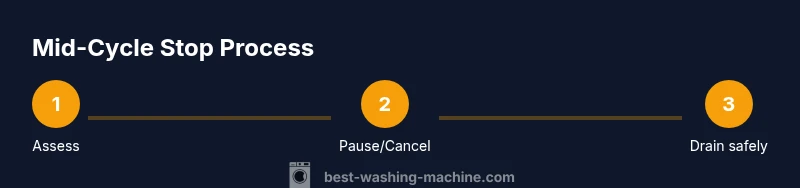
- Check cycle stage: wash, rinse, spin; if unsure, stop and reset
- Look for a Pause or Cancel function; press and wait for a safe transition
- If pause is unavailable: unplug and wait 10-20 seconds
- Safely drain water (bucket + drain hose) if water is present
- Re-lock the door only after water has drained
- Resume normal cycle or unload and dry hands
AUTHORITY SOURCES
For safety and best practices, consult official guidance and manufacturer manuals. General safety principles for appliance work are reinforced by federal safety agencies. See the following sources for authoritative information:
- https://www.cpsc.gov
- https://www.osha.gov
- https://www.energy.gov
Tools & Materials
- Washing machine owner's manual(Contains model-specific pause/cancel steps and drain options)
- Electrical power source access(Ensure the unit is easily accessible and can be unplugged safely)
- Safety gloves(Protect hands when handling hot water or sharp objects)
- Towel or absorbent mat(Catches spills during draining)
- Bucket and drain hose(Used for controlled water drainage)
- Flashlight(Helpful if access panels or hoses are hard to see)
Steps
Estimated time: 15-30 minutes
- 1
Assess cycle state and safety
Look at the current cycle stage and surrounding area. If you detect signs of danger (leakage, burning smell, unusual noise), stop and unplug immediately. Confirm you can access the control panel safely before attempting any action.
Tip: If water is high, prepare to drain carefully and avoid splashing toward electrical outlets. - 2
Try the built-in Pause/Cancel
If your model has a Pause or Cancel button, press it and wait for the machine to acknowledge. Some models will drain automatically after cancellation or present a draining option.
Tip: Hold the button for 2-3 seconds if required by the model; don’t press multiple different buttons at once. - 3
Use a manual power-off if needed
If no pause/cancel option works, unplug the machine or switch off at the outlet. Wait 10-20 seconds, then plug back in and reselect a cycle if you intend to resume. This resets the control board in many models.
Tip: Avoid yanking cords; use the power switch or unplug at the wall outlet. - 4
Drain the water safely
If water remains in the tub, place a towel and bucket, locate the drain hose, and lower it to direct water away from outlets. Some machines require you to position the drain hose or open a tap to start draining.
Tip: Keep the bucket ready and water flowing away from electrical sources at all times. - 5
Check door lock and seal
Once the water has drained, ensure the door or lid is unlocked before attempting to remove clothing or inspect the drum. A partially locked door can trap clothing or cause damage if forced.
Tip: Do not force a locked door; use the proper unlock sequence from the manual. - 6
Resume, unload, or test
Decide whether to resume the cycle, run a quick spin, or unload. If you resume, watch for balance issues or vibrations. If you’re done, dry hands and follow with a brief cold-water test wash to confirm normal operation.
Tip: Always inspect hoses and seals after any mid-cycle intervention.
FAQ
Can I stop a washing machine mid-cycle safely?
Yes, in many cases you can stop mid-cycle using Pause or Cancel. If your model lacks these options, unplug the unit and drain water cautiously. Always refer to the manual for model-specific steps.
Yes, most machines can be paused or canceled mid-cycle. If not available, unplug and drain water safely after checking the manual.
What should I do if the door locks during mid-cycle?
Do not force the door. Try the Pause or Cancel option first. If the door remains locked, wait for the cycle to end or consult the manual for a safe unlocking procedure.
Don’t force the door. Use pause or cancel, then check the manual for safe unlocking.
Is stopping early likely to damage clothes?
Stopping mid-cycle can affect heavy loads or delicate fabrics if not done carefully. Remove the items promptly and consider re-running a short cold cycle to reassess fabric safety.
There can be some risk to fabrics if you stop mid-cycle; handle clothes promptly and test with a short cycle.
How do I drain water manually if needed?
Place a towel and bucket, locate the drain hose, and carefully lower it to channel water away from outlets. Some models require specific sequences to start draining.
Use a towel and bucket, then guide the drain hose as instructed in your manual.
What if my machine has an error code after stopping?
Note the code, reset the machine per the manual, and consult support if the code persists. Error codes help identify underlying issues that stopping mid-cycle may reveal.
Record the error code, reset as directed by the manual, and seek help if it remains.
When should I call a professional?
If you detect persistent leaks, odd noises, not draining correctly, or frequent lockups, stop using the machine and schedule service. A professional can diagnose electrical or mechanical faults.
Call a professional if leaks, noises, or drainage problems persist after attempting a safe stop.
Watch Video
The Essentials
- Pause or cancel first when possible to minimize risk.
- Unplug safely if no built-in stop option exists.
- Drain water carefully and use the proper drain hose.
- Check for leaks or abnormal noises after stopping.