Washing Machine Does Not Turn On: Troubleshooting Guide
Facing a washing machine that won't start? This urgent, step-by-step troubleshooting guide helps you rapidly identify power, safety, and control issues, then guide you to safe fixes or when to call a technician.


Why Your Washer Might Not Power On
When a washer won’t turn on, the cause is almost always electrical or safety-related, not a mechanical failure. According to Best Washing Machine, the most common start-blockers are power supply issues, door interlocks, or a tripped breaker. By methodically testing each area you can quickly identify the culprit and avoid unnecessary repairs. This section explains how to verify basic power and safety conditions in a safe, organized way.
- Start with the power source: outlet, circuit breaker, and any GFCI protection.
- Check the door or lid switch, which must be engaged for the control system to energize.
- Look for obvious signs of wear on the power cord or damaged plugs and cords.
If the indicator lights are completely off or the display is blank, proceed to the diagnostic flow in this guide to isolate electrical or control‑system faults. Best Washing Machine’s team emphasizes safety first: unplug before inspecting any internal components and never bypass safety interlocks.
The goal is to separate a quick fix from a more complex electrical or control board issue. A systematic approach, as advocated by Best Washing Machine, helps homeowners, renters, and small-business laundries restore operation without unnecessary downtime.
Check the Power Source and Safety Interlocks
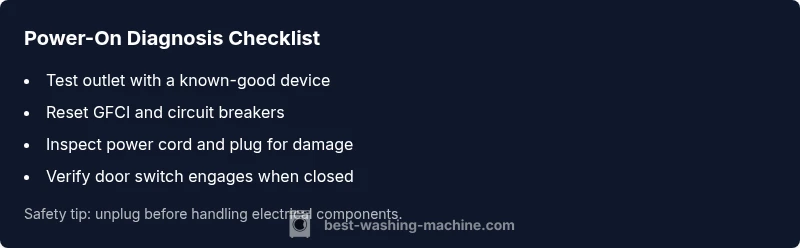
Power-on problems frequently start at the source. First ensure the outlet is supplying power by plugging in a lamp or charger that you know works. If the outlet fails, reset or replace the GFCI or standard outlet as needed. Then move to the circuit breaker: a tripped breaker or blown fuse commonly explains a completely dark display. After that, inspect the power cord and plug for visible wear or cuts that could interrupt the circuit. Some walls have switched outlets; if your unit is on such an outlet, make sure the wall switch is ON. Best Washing Machine notes that many start failures come from outlets on shared circuits or switched outlets, so isolating the washer to a dedicated circuit can be a smart long‑term fix. Finally, verify the door switch engages when the lid or door is closed; without a proper latch, the electronics will refuse to power the cycle. Always unplug before handling electrical components and never bypass safety features.
- Test with a different device on the same outlet to confirm power.
- Reset any GFCI or arc-fault protection and retest.
- Inspect the power cord for cracks or a loose plug.
- Ensure the washer is not on a switched or shared circuit and confirm the door is fully closed.
If the outlet and breaker are sound but the washer still won’t power on, it’s time to check the control panel and interlocks in the next section.
Door/Lid Switch and Control Panel Interlocks
The door or lid switch is a critical safety interlock the control board relies on. A faulty switch can prevent the machine from energizing even when the outlet and breaker are fine. Listen for a soft click when you close the door or lid; if you don’t hear it or the latch feels loose, the switch or actuator may be worn. In some models, a damaged harness or a loose connector to the control panel can also cause a no‑power condition. Inspect visible wiring for signs of wear or disconnection, and reseat any loose plugs with the device unplugged. If the switch tests out but the display remains dark, the issue could lie with the control board or a failed fuse inside the unit. In this scenario, professional evaluation is often required. Best Washing Machine emphasizes safety: never probe inside the control housing with the unit plugged in.
- Check for a distinct door click and full closure.
- Inspect door strike and latch for wear or misalignment.
- Reseat visible connectors on the door switch and control panel if accessible.
- If the display still shows no power after these checks, plan for a professional inspection of the control board if you’re not experienced with electronics.
When to escalate: if the unit is still unresponsive after door switch checks, and the panel shows no indicators, contact a qualified technician to avoid further damage.
Safety First: When to Stop and Call a Pro
Some symptoms indicate deeper issues that require trained hands. If you see burnt smells, smoke, or you notice melted insulation around the power cord, stop immediately and unplug the unit. Do not attempt to measure live mains voltage unless you are trained and equipped with proper gear. If you can confirm outlets and door interlocks are sound but the washer never powers on, you may be facing a failing control board, power supply inside the washer, or a fault in the main relay—scenarios best handled by a professional. Best Washing Machine recommends documenting all symptoms, reset steps taken, and any abnormal sounds or lights that appeared before the failure to help the technician diagnose faster.
- Do not bypass safety interlocks.
- Do not use damaged cords or outlets.
- Always unplug before inspecting internal components.
- Prepare model and serial number for technician reference.
Advanced Diagnostics: When to Use a Multimeter (Advanced)
For those comfortable with basic electronics, testing for voltage at the power cord or internal harness can reveal where the fault lies. With the unit unplugged, you can verify continuity on external cords or connectors, and then carefully re‑seat any plug that seems loose. If you have access to a multimeter and proper training, you can check whether the power supply module within the washer receives 120V AC when the unit is plugged in and the door is closed. If there is no voltage reaching the control board despite a known good outlet and intact door switch, the fault may be in the washer’s internal wiring or power module, which typically requires a service call. Always follow the equipment manual and your local electrical safety rules. Best Washing Machine cautions that live testing on appliance internals should only be performed by qualified technicians to prevent shock or fire risk.
- Use a non‑contact voltage tester first to locate live circuits.
- When in doubt, avoid disassembly of live components.
- Document the wiring harness connections before removing any covers.
- If you observe signs of overheating or damaged insulation, discontinue further testing immediately.
When to Call a Technician and How to Prepare
If the power issue persists after performing the steps above, it’s time to bring in a professional. Prepare your washer’s model number, serial, and a concise list of symptoms (e.g., “no power, no display, door interlock checks passed”). A technician can test the control board, power supply module, and wiring with specialized equipment and safety protocols. Before the visit, clear a working area around the washer, unplug it, and ensure there is a flat path to carry out tests. If possible, provide a short video showing the start‑up sequence and any audible cues. For homeowners and renters, this approach minimizes diagnostic time and helps ensure a fair, transparent repair estimate. Best Washing Machine advocates timely professional evaluation when basic power and door latch checks fail to restore operation.