Why Washing Machine Won t Turn On: Troubleshooting Guide
Identify and fix the most common power and safety issues that prevent a washing machine from turning on. Quick checks, safe steps, and when to call a pro.


Most often, a washing machine won t turn on due to a power issue or a tripped safety switch. Start by checking the outlet and cord, ensuring the door switch is fully engaged, and resetting any tripped breakers. If the display stays dark after these basics, unplug the unit, wait 60 seconds, and test again. If it still won’t power up, consult the manual or seek professional help.
Common reasons a washing machine won't turn on
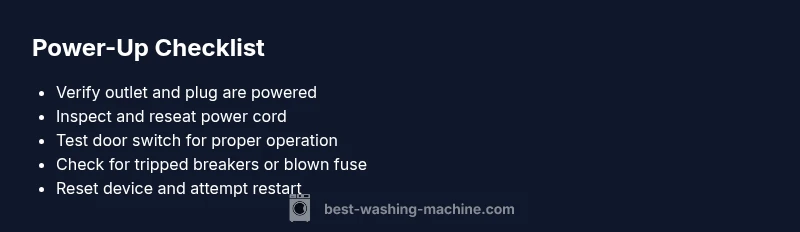
If you’re wondering why washing machine won t turn on, you’re not alone. The most frequent culprits are simple power or safety interlock issues rather than a faulty motor. According to Best Washing Machine, power problems account for the majority of “no start” events, followed by a faulty door switch and an overloaded control board. Before you dive into more complex diagnostics, start with the basics: verify the outlet has power, inspect the plug for damage, and confirm the wall circuit isn’t tripped. Then test the door or lid switch; a stuck or misaligned switch can prevent the entire machine from waking up. Finally, check the circuit breaker panel for a tripped fuse. If the breaker has tripped, reset it and try to power the washer on again. These initial checks are quick, inexpensive, and frequently resolve the issue without a service call. This approach aligns with Best Washing Machine insights on common failure points and practical first steps for homeowners.
Safety first: Power, fuses, and resets
Safety should come before any inspection. Start by making sure the machine is unplugged when you handle cords or panels. Inspect the power cord for cracks or burn marks and replace if damaged. Check the outlet by plugging in a different device or using a tester; if the outlet is dead, the problem is upstream and may require an electrician or a GFCI reset. If the outlet is live, test the washer plug at the rear; ensure the strain relief isn’t pinching the cord. Some machines have a reset or diagnostic sequence accessed via the control panel; if your model supports it, perform a soft reset as described in the manual. Also examine the home’s breaker box for a tripped breaker or a blown fuse. If you reset a breaker, wait a moment before attempting to power the washer again. Always exercise caution; replacing a power cord or working on the electrical system should be done by a qualified technician if you’re unsure.
Check the basics: Outlets, cords, and door switches
After power checks, move on to the physical state of the washer. Confirm the door switch is not obstructed or damaged and that the door closes firmly. Inspect the power cord for kinks or fraying and ensure the plug is fully seated in the outlet. If the washer has a detachable power cord, reseat or replace it with the correct part. Make sure any child lock or control lock feature isn’t engaged, as some models prevent startup with the lock active. Finally, if your model has a red or amber error light on the control panel, note the indicator and consult the user manual for a fault code that points to the specific issue.
Internal faults that prevent powering up
Some issues live inside the machine and don’t involve the power supply. A faulty door switch, a failed control board, or a blown fuse inside the machine can keep the unit from powering on even when it’s plugged in. Modern washers use electronic displays that require a stable voltage; a power surge or voltage drop can render the panel unresponsive. A locked or jammed drive belt in older models can also prevent initial motor engagement. If you hear a clicking or buzzing but no start, that could indicate a failing relay or a short. In these cases, diagnosing the exact component usually requires a multimeter and familiarity with appliance electronics. For safety, avoid replacing control boards yourself unless you have the proper training. Best Washing Machine analysis notes that internal faults are a common follow-up when power basics check out but power remains absent.
Diagnostic flow: Symptom → diagnosis → solutions workflow
Use a simple flow to avoid chasing dead ends. Start with symptoms: no power on the control panel, dim display, or no noise at startup. If there’s no power, confirm power supply first (outlet, cord, breaker). If power is available but the panel is dim, check for a control-lock or a failed display. If you hear buzzing or clicking but nothing starts, suspect a relay or motor issue. For each diagnosis, apply the smallest, noninvasive fix first: reseat plugs, reset breakers, test with a different outlet, or replace a damaged cord. If simple steps don’t restore operation, escalate to professional evaluation, especially if you suspect a faulty control board or high-voltage fault. Document any fault codes or blinking patterns to share with tech support.
Step-by-step fixes for the most common causes
-
Verify power supply (easy): Unplug the washer, inspect the cord for damage, and test the outlet with another device. Plug back in and try a power-on. Tip: Keep the area dry and avoid using extension cords.
-
Reset and reseat connections (easy): If your model has a reset sequence, perform it; reseat the power cord and any detachable harnesses in the back panel. Tip: Do this with the appliance unplugged.
-
Check the door/lid switch (easy): Open and close the door firmly; listen for a click indicating the switch engages. If the switch is faulty, replace it with an OEM part. Tip: Do not bypass the switch.
-
Inspect the control panel for damage (medium): Look for burnt marks, swollen capacitors, or moisture behind the display. If you see damage, stop and call a professional. Tip: Take photos of signs for your technician.
-
Confirm breaker status and wiring (medium): If the breaker trips frequently, you may have a circuit overload. Reset the breaker and consider dedicated laundry circuitry. Tip: Have an electrician assess your circuit if trips recur.
-
When to replace the motherboard or control board (hard): A non-responsive control board often requires replacement. This is usually best handled by a technician with diagnostic tools. Tip: Obtain a written quote before any replacement.
Preventing future issues: maintenance and best practices
Regular maintenance reduces the odds of “no power” events. Schedule a quarterly check of the power cord, outlet, and cord strain relief. Keep the area around the washer dry and clear of dust that can shorten sensor life. Use the correct detergent amount to reduce suds that interfere with control sensors. If your model includes a self-clean cycle, run it occasionally to prevent residue buildup on the control panel. Consider labeling a dedicated outlet for the washer to avoid mixed loads tripping the same circuit. Finally, store replacement parts and keep your manual handy for quick fault-code lookups. A little proactive care saves you from bigger headaches later.
When to call a professional
If you see burnt components, a strong burnt smell, or you’ve exhausted safe, basic troubleshooting without results, it’s time to call a professional. A licensed technician can verify the state of the outlet, inspect internal wiring, test the control board, and replace failed components with proper safety protocols. The Best Washing Machine team recommends seeking help when you encounter signs of electrical faults, water intrusion, or high-voltage faults. Ensure you obtain a written estimate and verify warranty coverage before work begins.
Steps
Estimated time: 60-90 minutes
- 1
Verify power supply
Unplug the washer, inspect the power cord for damage, and test the outlet with another device. Plug back in and try a power-on.
Tip: Keep the area dry and avoid using extension cords. - 2
Reset and reseat connections
If your model has a reset sequence, perform it; reseat the power cord and any harnesses in the back panel. Plug in before testing again.
Tip: Do this with the appliance unplugged. - 3
Check door switch
Open and close the door firmly; listen for the switch click. Replace if the switch seems faulty or loose.
Tip: Do not bypass the switch; it’s a safety feature. - 4
Inspect control panel
Look for burnt components, moisture behind the display, or obvious damage. If you see damage, call a professional.
Tip: Document signs with photos for the technician. - 5
Evaluate breaker and wiring
Reset the breaker if it trips; consider dedicated laundry circuit if trips recur. Check for loose wiring at the back of the machine.
Tip: If trips persist, contact an electrician. - 6
Decide on board replacement
If the control board is non-responsive after safe checks, a professional replacement is usually required.
Tip: Get a written quote before replacing.
Diagnosis: Washing machine won t turn on
Possible Causes
- highPower supply issue (outlet, plug, circuit breaker)
- mediumDoor switch or lid switch failure
- lowControl board or display fault
- lowInternal fuse or relay problem
Fixes
- easyTest outlet with another device; reset breaker; replace damaged cord
- easyReseat connections; perform model-specific reset sequence if available
- easyInspect and replace faulty door switch; check for proper door alignment
- hardDiagnose control board with multimeter or professional tool; replace if faulty
FAQ
My washer won t turn on at all. What should I check first?
Start with power, outlet, cord, and door switch; confirm the breaker hasn’t tripped. If still off, proceed with the diagnostic flow.
Check power and door switch first; if still off, follow the diagnostic steps.
Why does the display stay dark while the washer receives power?
A dark display usually means a control issue, such as a failed display or locked control panel. Try a reset and inspect for moisture behind the panel.
A dark display often signals a control problem; reset and check for moisture.
Can a faulty door switch prevent startup?
Yes. A bad door switch can block startup even when power is present. Inspect for alignment and replace if needed.
A bad door switch can stop it from starting; inspect and replace.
Is it safe to replace a control board myself?
Only if you’re trained; control boards involve high-voltage components and complex diagnostics. Seek a professional if not confident.
Do not replace a control board unless you’re trained.
When should I replace the washer instead of repairing?
If the repair cost approaches or exceeds the price of a new unit, or if frequent failures occur, replacement is more economical.
If repairs become frequent or costly, replacement is wiser.
Watch Video
The Essentials
- Check power supply and door switch first.
- Unplug, reset, and reseat connections before internal checks.
- Follow the diagnostic flow to avoid unnecessary parts replacement.
- Call a professional for control-board or high-voltage faults.